


 DjLaja
A mapper for the rmx would be great , heared about some one is on it yet.
Thanks .
J
Thanks .
J
Posté Tue 16 Sep 08 @ 1:56 pm
 jimmy b
I think alot of people are waiting for a mapper
Posté Tue 16 Sep 08 @ 2:16 pm
 cioce
cioce
Easy, just download http://www.virtualdj.com/addons/4830/RMX_config_.html & map ;)
Posté Wed 17 Sep 08 @ 3:02 am
 raynordinho
i the mac version coming also ?!
Posté Wed 17 Sep 08 @ 6:20 pm
jimmy b
For give me for being abit thick Cioce, but say if I want to change 4 button action, then I have to have 4 plugins.
The decriptive is not all that clear, thanks.
Posté Wed 17 Sep 08 @ 6:27 pm
 SBDJ
SBDJ
Thats what it looks like to me from the description :)
Posté Fri 19 Sep 08 @ 7:41 am
cioce
RMX config v1.0 by DJCel
Compatibie VirtualDJ 5.2.1
Attention: This TOOL is an audio effect and it require a skin with dedicated slot multibuttons like for example:
Vinyl Scratch variations (Scratch5:Basic_Gray(1280x800) v2) http://it.virtualdj.com/addons/4369/Vinyl_Scratch_variations.html
or latest Hercules RMX http://it.virtualdj.com/addons/4554/Hercules_RMX_variations.html
Follow this procedure to map the buttons:
1) Download and install RMX1.exe
2) enter into the folder C:\Documents and Settings\Digital\Documenti\VirtualDJ\Plugins\SoundEffect
copy for 12 times the dll and rename like:
RMX1.DLL
RMX2.DLL
RMX3.DLL
......
RMX12.DLL
3) open Virtualdj and enter in the effects zone, click on RMX1 and select the action (shortcut):
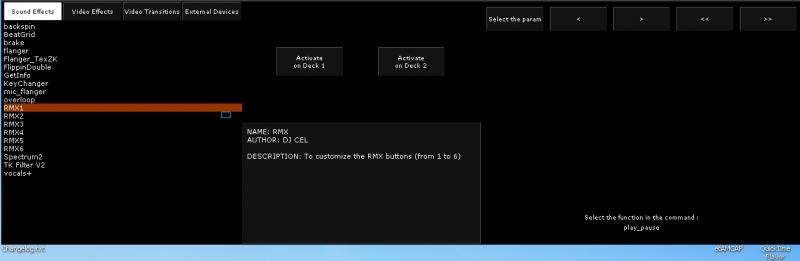
4) load the effect into the slot (right click and select)
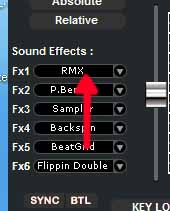
Fx1= button 1 RMX
Fx2= button 2 RMX
Fx3= button 3 RMX
Fx4= button 4 RMX
Fx5= button 5 RMX
Fx6= button 6 RMX
5) Follow the same procedure for the other deck.
Download -> http://www.virtualdj.com/addons/4830/RMX_config_.html
I don't know.
@ jimmy b
Waiting for a beer :))))
Thanks to DJCel for the tool and to Moramax for the print screen ;)
Compatibie VirtualDJ 5.2.1
Attention: This TOOL is an audio effect and it require a skin with dedicated slot multibuttons like for example:
Vinyl Scratch variations (Scratch5:Basic_Gray(1280x800) v2) http://it.virtualdj.com/addons/4369/Vinyl_Scratch_variations.html
or latest Hercules RMX http://it.virtualdj.com/addons/4554/Hercules_RMX_variations.html
Follow this procedure to map the buttons:
1) Download and install RMX1.exe
2) enter into the folder C:\Documents and Settings\Digital\Documenti\VirtualDJ\Plugins\SoundEffect
copy for 12 times the dll and rename like:
RMX1.DLL
RMX2.DLL
RMX3.DLL
......
RMX12.DLL
3) open Virtualdj and enter in the effects zone, click on RMX1 and select the action (shortcut):
4) load the effect into the slot (right click and select)
Fx1= button 1 RMX
Fx2= button 2 RMX
Fx3= button 3 RMX
Fx4= button 4 RMX
Fx5= button 5 RMX
Fx6= button 6 RMX
5) Follow the same procedure for the other deck.
Download -> http://www.virtualdj.com/addons/4830/RMX_config_.html
raynordinho wrote :
i the mac version coming also ?!
I don't know.
@ jimmy b
Waiting for a beer :))))
Thanks to DJCel for the tool and to Moramax for the print screen ;)
Posté Fri 19 Sep 08 @ 7:52 am
jimmy b
cioce wrote :
@ jimmy b
Waiting for a beer :))))
Waiting for a beer :))))
It's in the post mate ;)
Thanks Cioce, I undersatnd now mate.
I will try it out after the weekend.
Posté Fri 19 Sep 08 @ 8:53 am
 djcel
djcel
Yes the code is MAC compatible that's why I used this solution.
I have started a new version of this plugin which is easier to use and avoids to copy the dll.
As soon as i can do it, I will finish and compile it for PC & MAC.
I have started a new version of this plugin which is easier to use and avoids to copy the dll.
As soon as i can do it, I will finish and compile it for PC & MAC.
Posté Fri 19 Sep 08 @ 7:13 pm
 Lim De La Cruz
Hey There i didn't quiet figured it out how to put the effects in to my rmx ??
cause i don't quiet understand the discription ....
I Followed all of the steps and got stuck on the 3rd one, because i can't open the slots
to put in any of the FX ....
Can someone help me out?
Thnx
cause i don't quiet understand the discription ....
I Followed all of the steps and got stuck on the 3rd one, because i can't open the slots
to put in any of the FX ....
Can someone help me out?
Thnx
Posté Wed 24 Sep 08 @ 3:34 pm
alejosto
jje vna pregvnta se pveden descargar los efectos?
Please don't SPAM, otherwise your account will be LOCKED!
Please don't SPAM, otherwise your account will be LOCKED!
Posté Sun 28 Sep 08 @ 12:04 am
 DjFella
hello
so thanks a lot for this plugin. My buttons work great with the new Version.
A big thanks to Dj Cel who made the Plugin and to Cioce for the nice explantation.
Ps: Armin and i will make a german explantation for our forum users :-)
so thanks a lot for this plugin. My buttons work great with the new Version.
A big thanks to Dj Cel who made the Plugin and to Cioce for the nice explantation.
Ps: Armin and i will make a german explantation for our forum users :-)
Posté Tue 30 Sep 08 @ 7:37 am
 pOpYDJ
Hey, could you make your plugin that it works like the "RMX Button Configurator" from moramax??
I dont want to use an other skin to make this work. Ill just use the "Internal Mixer" Skin. The RMX Button Configurator doesnt work with newer Versions than 5.1 ;-((
cu
pOpY
I dont want to use an other skin to make this work. Ill just use the "Internal Mixer" Skin. The RMX Button Configurator doesnt work with newer Versions than 5.1 ;-((
cu
pOpY
Posté Fri 31 Oct 08 @ 1:45 pm
xonets
tell me a license code, please. i can't download plugins from this site
Posté Tue 04 Nov 08 @ 3:03 am
cioce
A licence is here http://www.virtualdj.com/buy/index.html ;)
@ pOpYDJ
Sorry but fot the moment this is the only way to MAP the 6+6 buttons with VDJ 5.2.
@ pOpYDJ
Sorry but fot the moment this is the only way to MAP the 6+6 buttons with VDJ 5.2.
Posté Tue 04 Nov 08 @ 3:45 am
 fatkatzdj
thank you, cioce!
Posté Wed 05 Nov 08 @ 1:41 am
 spacecowboy_uk2001
Hi i'm able to map the buttons but when i close VDJ the mappings are lost. Is this the case for everyone or am i doing something wrong??
Cheers
Cheers
Posté Thu 06 Nov 08 @ 3:18 pm
pOpYDJ
Thats not good news ;-(
The RMX Hardware works very well, but it seems nobody would write a REALLY mapper ;-(
cu
pOpY
The RMX Hardware works very well, but it seems nobody would write a REALLY mapper ;-(
cu
pOpY
Posté Fri 07 Nov 08 @ 1:04 pm
cioce
For what I know the best "mapper" teamer (Moramax) is at work to release a mapper ;)
Posté Fri 14 Nov 08 @ 1:31 am
 moramax
thank you cioce!;)
yes, i'm working on an optimized mapper for the Hercules RMX.
yes, i'm working on an optimized mapper for the Hercules RMX.
Posté Fri 14 Nov 08 @ 9:04 am
