


 sbhoopsfan
i have followed these instructions, installed the rmx.dll, and renamed them 12 times.
I cant figure out how to actually select an effect to go with the buttons. Can anyone help me out? I would appreciate it.
Thanks,
Pete
I cant figure out how to actually select an effect to go with the buttons. Can anyone help me out? I would appreciate it.
Thanks,
Pete
Posté Wed 25 Mar 09 @ 8:14 pm
 pOpYDJ
Have you selected one of the following skins:
Vinyl Scratch variations (Scratch5:Basic_Gray(1280x800) v2) http://it.virtualdj.com/addons/4369/Vinyl_Scratch_variations.html
or latest Hercules RMX http://it.virtualdj.com/addons/4554/Hercules_RMX_variations.html
You mus select on of the skins (these have the 6 FX slots per deck). On these skins you can set the "rmx" plugin in every slot. in the Effect configuraion you can assign a function to every RMXx.dll.
cu
pOpY
Vinyl Scratch variations (Scratch5:Basic_Gray(1280x800) v2) http://it.virtualdj.com/addons/4369/Vinyl_Scratch_variations.html
or latest Hercules RMX http://it.virtualdj.com/addons/4554/Hercules_RMX_variations.html
You mus select on of the skins (these have the 6 FX slots per deck). On these skins you can set the "rmx" plugin in every slot. in the Effect configuraion you can assign a function to every RMXx.dll.
cu
pOpY
Posté Thu 26 Mar 09 @ 2:22 am
sbhoopsfan
Im using VDJ vs RMX which does have the slots. I have selected rmx 1-12 in each of the slots. My problem is where do i select the effect to go with the button?
Posté Thu 26 Mar 09 @ 9:01 pm
pOpYDJ
Go to the Sound effects (where you can select, activate and configure an sound effect). If you can select the RMX plugins in the slot configuration then you must see the RMX 1-12 in the sound effect configuration. Select one and on the right side you can set a function!
cu
popY
cu
popY
Posté Fri 27 Mar 09 @ 2:19 am
 radiofc
jean3893 wrote :
guys i have figured it out about the 6+6 buttons
Since i had the m2k still installed, i deleted all files with virtual dj and hercules.
Reinstall everything back, download the effects.
Once you download the virtual dj pro, you go back again to the djcedition steep pc, there you can go to the 6 button and choose which effects you want to put, no need to download anything of like rmx 1 configuration thing.
It works like a charm lol, im loving the rmx now. let's hope this helps anyone out there
Since i had the m2k still installed, i deleted all files with virtual dj and hercules.
Reinstall everything back, download the effects.
Once you download the virtual dj pro, you go back again to the djcedition steep pc, there you can go to the 6 button and choose which effects you want to put, no need to download anything of like rmx 1 configuration thing.
It works like a charm lol, im loving the rmx now. let's hope this helps anyone out there
Hmmm this might explain some of the problems I am having too. I have a gig tonight so I won't go messing with my system now but next week I will look to uninstall VDJ and reinstall as the MK2 may have left things behind that I don't want. Cheers.
Posté Fri 27 Mar 09 @ 12:06 pm
 diegopulla
need help how to configure this
Posté Sat 28 Mar 09 @ 8:23 pm
 SBDJ
SBDJ
I believe you need VirtualDJ Professional to use this.
Posté Mon 30 Mar 09 @ 12:45 pm
Whitepete
As you can see i dont have a proi version of virtual dj yet, but my limited edition allows me to test it for 20 days. I will buy it as soon as i can be sure that all funktions i need in vdj work with my rmx.
I am looking for a real mapper for the rmx now, or for a good one using the 6+6 buttons. My problems is, that i need the funktions which the mk2 provided, i want to have a button to make the loop shorter (4->2->1->1/2....) one to activate the chosen length and a third one to make them longer (....2->4->8->16...). IS there any way to get this funktion ? OR can anybody tell me a better way to mix with loops?
Greetz >Paul
I am looking for a real mapper for the rmx now, or for a good one using the 6+6 buttons. My problems is, that i need the funktions which the mk2 provided, i want to have a button to make the loop shorter (4->2->1->1/2....) one to activate the chosen length and a third one to make them longer (....2->4->8->16...). IS there any way to get this funktion ? OR can anybody tell me a better way to mix with loops?
Greetz >Paul
Posté Wed 01 Apr 09 @ 10:59 am
 DHoude
Download the Mix Lab 3.1 skin. You can only use it with VDJ (which should work with the trial). That skin is what VDJ should use by default. It is a work of art. I gives buttons for 1,2,4,8,16 and 32 beat loops. Plus you can manuallty make your own loops and tweak them.
I have edited that skin (now named Mix Lab 3.2) to allow you to config the 6+6 RMX effect buttons as well. You can also use the effect buttons (in my skin) without the RMX. I am still testing it, but seems good so far. PM me your email if you want me to send it to you.
I have edited that skin (now named Mix Lab 3.2) to allow you to config the 6+6 RMX effect buttons as well. You can also use the effect buttons (in my skin) without the RMX. I am still testing it, but seems good so far. PM me your email if you want me to send it to you.
Posté Wed 01 Apr 09 @ 5:14 pm
pOpYDJ
@sbhoopsfan: You select \"Effects\" - \"Sound Effects\" and there you must see RMX1-12:
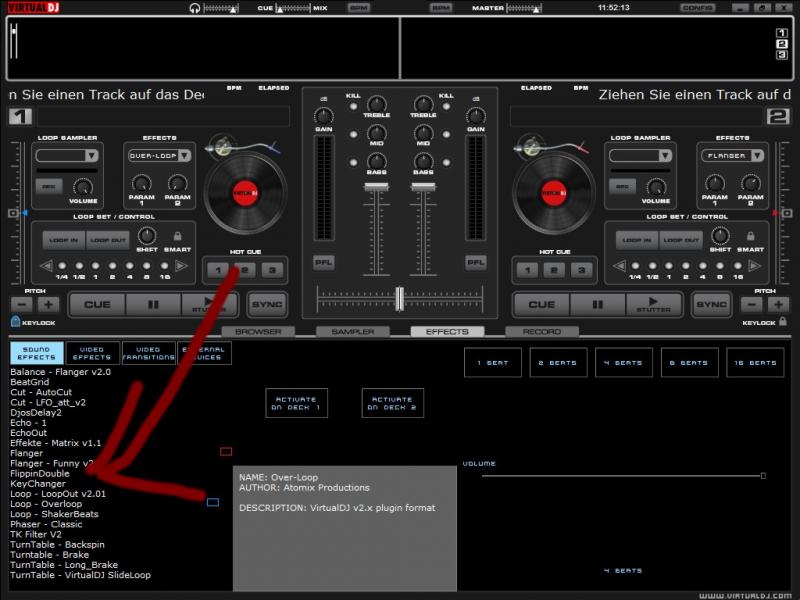
In these Picture you doesnt see the RMX1-12 Plugins but currently i cant download plugins?!?
If you can select the RMX1-12 Plugins in your button Slots you MUST see the RMX1-12 Plugins here.
Select one and on the rigth side you can select an effect that should be acctivated if you press Button X
Ill hope this will help you.
cu
pOpY
In these Picture you doesnt see the RMX1-12 Plugins but currently i cant download plugins?!?
If you can select the RMX1-12 Plugins in your button Slots you MUST see the RMX1-12 Plugins here.
Select one and on the rigth side you can select an effect that should be acctivated if you press Button X
Ill hope this will help you.
cu
pOpY
Posté Thu 09 Apr 09 @ 4:56 am
djsianito
I think alot of people are waiting for a mapper
Posté Tue 05 May 09 @ 10:47 am
DHoude
I agree, that is what I am waiting for. Hercules is developing a mapper now from what I understand (as stated in thier latest driver release).
The "RMX config" plug in works for me, but I have to change my sound card (from Hercules to anything else) in the config menu of VDJ before closing. If I don't, then I loose the effects that I selected. That has also made for some interesting starts when I forget to set the RMX as the sound card durning my next use and my set comes on at full volume with no way to control it! I got startled at my house a few times that way now, and my rabbits, they LOVE it when that happens! :)
I tried to ask the author if there was another way to fix this, but I got no response.
The "RMX config" plug in works for me, but I have to change my sound card (from Hercules to anything else) in the config menu of VDJ before closing. If I don't, then I loose the effects that I selected. That has also made for some interesting starts when I forget to set the RMX as the sound card durning my next use and my set comes on at full volume with no way to control it! I got startled at my house a few times that way now, and my rabbits, they LOVE it when that happens! :)
I tried to ask the author if there was another way to fix this, but I got no response.
Posté Sun 10 May 09 @ 10:31 am
marcogr17.r
Hola y gracias
Posté Thu 04 Jun 09 @ 2:46 pm
pOpYDJ
This issue posted by DHoude is in >=v6.0 solved. There is and there is an complete new Mapper ;-)
cu
cu
Posté Thu 04 Jun 09 @ 3:16 pm
zergbv
HAY TO ALL
Posté Sun 06 Nov 11 @ 3:00 am