


 christophekaraoké
Hello,
I am experiencing exactly the same issue with my Denon DJ MCX8000 and VirtualDJ 2026.
FX buttons 2 and 3 work normally.
FX button 1 does not activate, even if I change the assigned effect.
The FX1_PARAM knobs (left and right decks) are also not responding.
This problem appeared immediately after updating to VirtualDJ 2026.
I am using the default factory mapping, no custom scripts.
Clean Windows 11 installation, no SoundSwitch running.
It looks like FX slot 1 is not triggering correctly in this version.
Has anyone found a solution or identified a mapping change in 2026?
Thank you.
I am experiencing exactly the same issue with my Denon DJ MCX8000 and VirtualDJ 2026.
FX buttons 2 and 3 work normally.
FX button 1 does not activate, even if I change the assigned effect.
The FX1_PARAM knobs (left and right decks) are also not responding.
This problem appeared immediately after updating to VirtualDJ 2026.
I am using the default factory mapping, no custom scripts.
Clean Windows 11 installation, no SoundSwitch running.
It looks like FX slot 1 is not triggering correctly in this version.
Has anyone found a solution or identified a mapping change in 2026?
Thank you.
Posté 2 days ago @ 12:49 pm
christophekaraoké
🔎 System Configuration
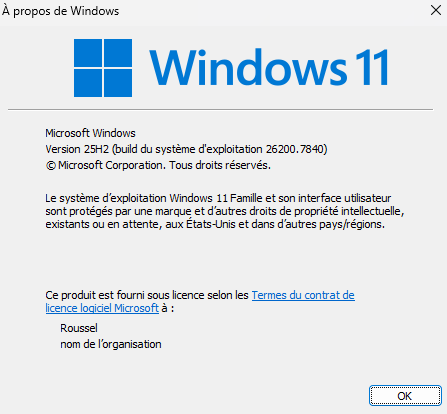
Computer: PC Windows
Operating System:
Windows 11 Home
Version 25H2
OS Build: 26200.7840
VirtualDJ:
Version 2026 (build b9005)
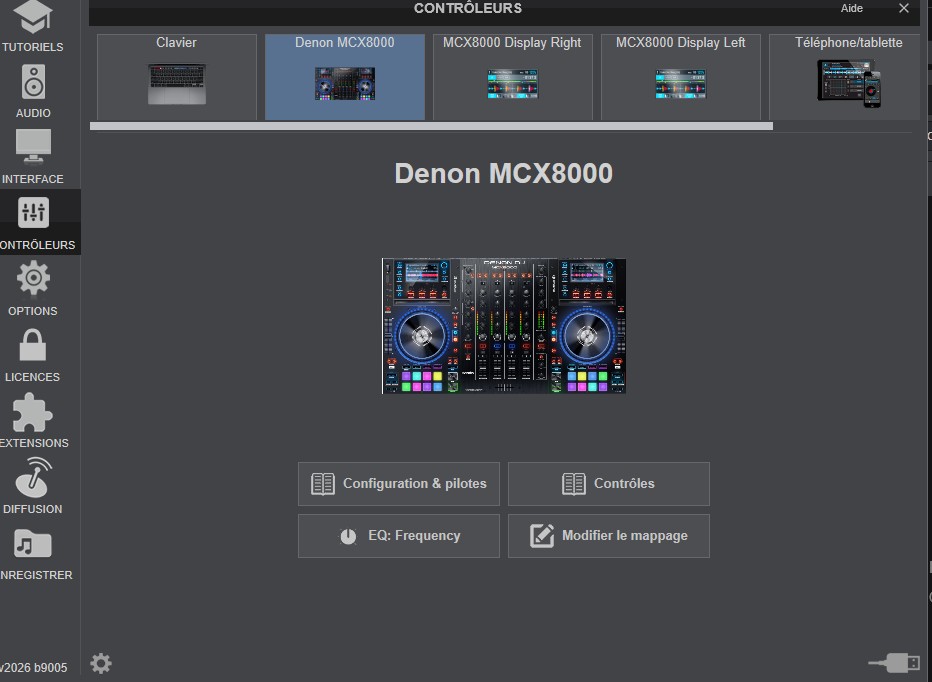
Controller: Denon MCX8000
Connected via direct USB (no hub)
Firmware versions (from Utility screen):
Engine Version: 0332
Display Version: Left 5170 / Right 5170
MCU Version: 2076
(All screenshots attached.)
🧩 Issue Description
Hello,
I am experiencing issues with my Denon MCX8000 on VirtualDJ 2026.
VirtualDJ starts correctly, the controller is properly detected in the Controllers tab, and audio works.
However, I have the following problems:
1️⃣ FX Issue
On both decks:
FX Button 1 → FLANGER STR → does NOT work
FX Button 2 → FILTER LP POS → works
FX Button 3 → FILTER HP POS → works
If I change the effect assigned to FX Button 1, it still does not respond.
This happens on both decks.
2️⃣ Startup behavior
Sometimes VirtualDJ has difficulty opening (launch behavior not always normal).
❓ Questions
Could this be related to:
Windows 11 version 25H2 (build 26200.7840)?
A compatibility issue with the latest Windows update?
A mapping issue?
A firmware interaction problem?
Has anyone tested MCX8000 successfully on Windows 11 25H2?
Thank you for your help.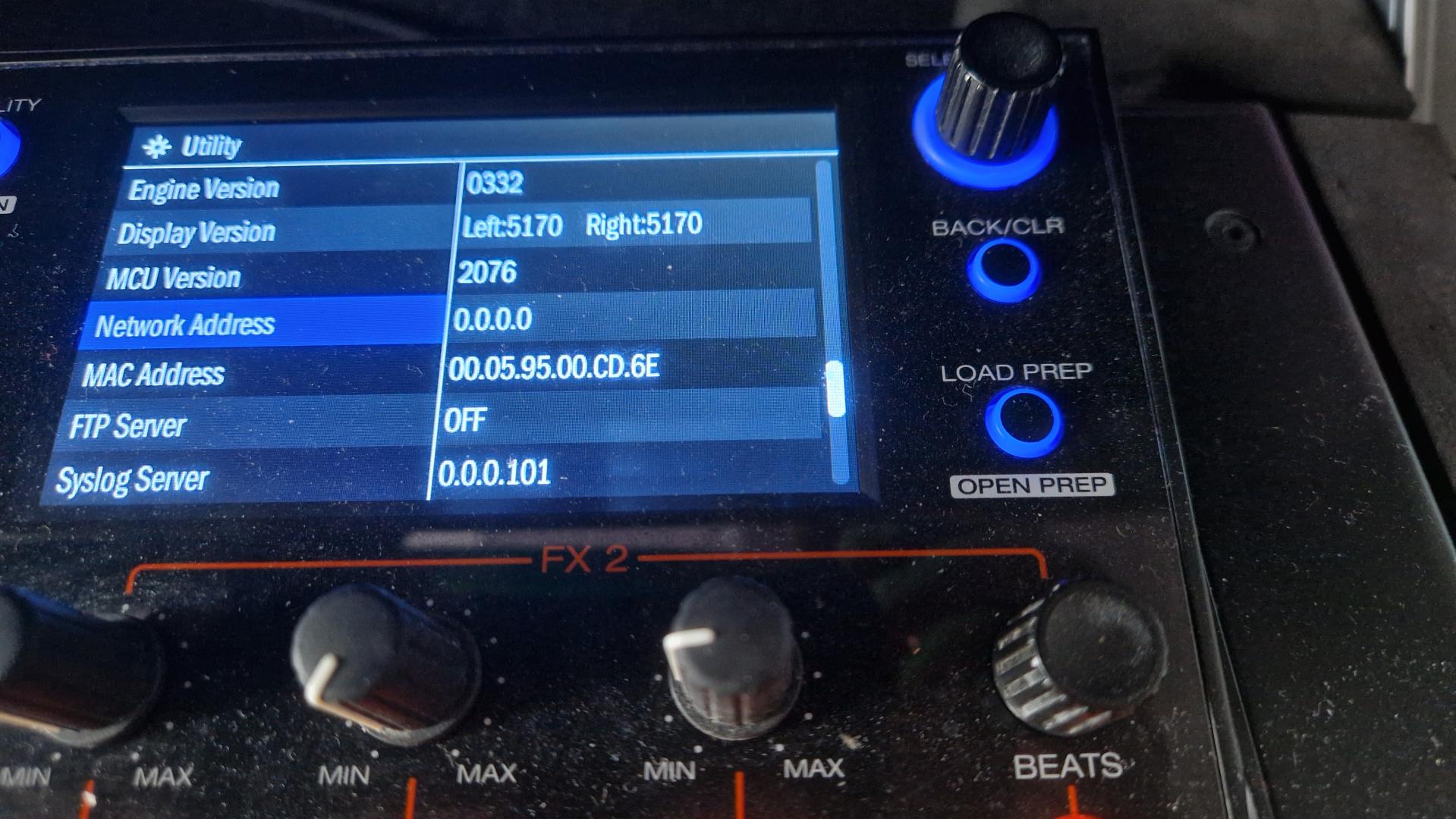
Computer: PC Windows
Operating System:
Windows 11 Home
Version 25H2
OS Build: 26200.7840
VirtualDJ:
Version 2026 (build b9005)
Controller: Denon MCX8000
Connected via direct USB (no hub)
Firmware versions (from Utility screen):
Engine Version: 0332
Display Version: Left 5170 / Right 5170
MCU Version: 2076
(All screenshots attached.)
🧩 Issue Description
Hello,
I am experiencing issues with my Denon MCX8000 on VirtualDJ 2026.
VirtualDJ starts correctly, the controller is properly detected in the Controllers tab, and audio works.
However, I have the following problems:
1️⃣ FX Issue
On both decks:
FX Button 1 → FLANGER STR → does NOT work
FX Button 2 → FILTER LP POS → works
FX Button 3 → FILTER HP POS → works
If I change the effect assigned to FX Button 1, it still does not respond.
This happens on both decks.
2️⃣ Startup behavior
Sometimes VirtualDJ has difficulty opening (launch behavior not always normal).
❓ Questions
Could this be related to:
Windows 11 version 25H2 (build 26200.7840)?
A compatibility issue with the latest Windows update?
A mapping issue?
A firmware interaction problem?
Has anyone tested MCX8000 successfully on Windows 11 25H2?
Thank you for your help.
Posté 2 days ago @ 2:53 pm
christophekaraoké
🔎 System Configuration
Main Computer (problem machine):
Windows 11 Home
Version 25H2
OS Build: 26200.7840
VirtualDJ:
Version 2026 (build b9005)
Controller:
Denon MCX8000
Connected directly via USB (no hub)
Firmware versions:
Engine Version: 0332
Display Version: Left 5170 / Right 5170
MCU Version: 2076
(All screenshots attached.)
🧩 Background
The last full live use of this PC with the Denon MCX8000 was on New Year’s Eve 2025 during a professional event.
Everything was working perfectly at that time.
Recently, I started using it again to prepare DJ sets, and that is when I noticed the issue.
The problem appeared after updating to VirtualDJ 2026.
Between 31/12/2025 and today (26/02/2026), something must have changed:
A Windows update
A VirtualDJ update
Or another software-related modification
From my side, I did not intentionally change anything in my hardware setup or workflow.
🔧 Troubleshooting Already Performed
To try to fix the issue, I have:
Reinstalled VirtualDJ 2026
Rolled back to older 2025 builds
Completely reinstalled Windows
Reinstalled all drivers
Tested different USB configurations
Purchased and installed a new PCI USB card
Replaced the motherboard of the PC
This unfortunately resulted in significant additional costs.
Despite all of this, the problem remains.
🖥 Comparative Test
I tested the same Denon MCX8000 controller on another laptop running:
Windows 10
VirtualDJ 2026 (latest build)
On that system, everything works perfectly:
No FX issues
No crossfader/browser issues
So:
The controller is not defective
The firmware is correct
VirtualDJ 2026 works properly
The issue appears to be specific to my Windows 11 25H2 PC.
🎛 Issues Observed (Windows 11 PC Only)
1️⃣ FX Issue (both decks)
FX 1 → FLANGER STR → does NOT respond
FX 2 → FILTER LP POS → works
FX 3 → FILTER HP POS → works
Changing the assigned effect does not fix the issue.
2️⃣ Crossfader / Browser Issue (intermittent)
Occasionally, the crossfader moves the browser file list (track list) instead of only controlling audio.
This is very problematic during live DJ performance.
❓ Request
At this point, I cannot determine the root cause.
Could this be:
A compatibility issue with Windows 11 25H2 (build 26200.7840)?
A problematic Windows update?
A conflict with VirtualDJ 2026?
A configuration corruption despite full reinstallation?
This PC is my main professional performance machine (including video mixing), and I would like to continue using it, as it previously worked perfectly.
Any help or technical guidance would be greatly appreciated.
Thank you very much for your support.
Main Computer (problem machine):
Windows 11 Home
Version 25H2
OS Build: 26200.7840
VirtualDJ:
Version 2026 (build b9005)
Controller:
Denon MCX8000
Connected directly via USB (no hub)
Firmware versions:
Engine Version: 0332
Display Version: Left 5170 / Right 5170
MCU Version: 2076
(All screenshots attached.)
🧩 Background
The last full live use of this PC with the Denon MCX8000 was on New Year’s Eve 2025 during a professional event.
Everything was working perfectly at that time.
Recently, I started using it again to prepare DJ sets, and that is when I noticed the issue.
The problem appeared after updating to VirtualDJ 2026.
Between 31/12/2025 and today (26/02/2026), something must have changed:
A Windows update
A VirtualDJ update
Or another software-related modification
From my side, I did not intentionally change anything in my hardware setup or workflow.
🔧 Troubleshooting Already Performed
To try to fix the issue, I have:
Reinstalled VirtualDJ 2026
Rolled back to older 2025 builds
Completely reinstalled Windows
Reinstalled all drivers
Tested different USB configurations
Purchased and installed a new PCI USB card
Replaced the motherboard of the PC
This unfortunately resulted in significant additional costs.
Despite all of this, the problem remains.
🖥 Comparative Test
I tested the same Denon MCX8000 controller on another laptop running:
Windows 10
VirtualDJ 2026 (latest build)
On that system, everything works perfectly:
No FX issues
No crossfader/browser issues
So:
The controller is not defective
The firmware is correct
VirtualDJ 2026 works properly
The issue appears to be specific to my Windows 11 25H2 PC.
🎛 Issues Observed (Windows 11 PC Only)
1️⃣ FX Issue (both decks)
FX 1 → FLANGER STR → does NOT respond
FX 2 → FILTER LP POS → works
FX 3 → FILTER HP POS → works
Changing the assigned effect does not fix the issue.
2️⃣ Crossfader / Browser Issue (intermittent)
Occasionally, the crossfader moves the browser file list (track list) instead of only controlling audio.
This is very problematic during live DJ performance.
❓ Request
At this point, I cannot determine the root cause.
Could this be:
A compatibility issue with Windows 11 25H2 (build 26200.7840)?
A problematic Windows update?
A conflict with VirtualDJ 2026?
A configuration corruption despite full reinstallation?
This PC is my main professional performance machine (including video mixing), and I would like to continue using it, as it previously worked perfectly.
Any help or technical guidance would be greatly appreciated.
Thank you very much for your support.
Posté 2 days ago @ 3:03 pm
christophekaraoké
Technical Question
Given the behavior observed, I am wondering whether a recent Windows 11 update (25H2 – build 26200.7840) may have modified something related to:
USB HID drivers
MIDI device handling
MIDI message interpretation
Device enumeration order
Or low-level USB communication
Since:
The controller works perfectly on Windows 10
The issue affects specific controls (FX 1 not responding)
The crossfader occasionally triggers browser scrolling (which suggests unexpected MIDI mapping behavior)
The problem persists even after reinstalling Windows
Could there be a change in how Windows 11 25H2 handles USB HID or MIDI devices that might interfere with VirtualDJ’s controller communication?
Is there anything specific I could check regarding:
HID driver versions
MIDI device priority
Hidden duplicate MIDI devices
Or registry-level device entries
Any guidance on deeper diagnostic steps would be greatly appreciated.
Given the behavior observed, I am wondering whether a recent Windows 11 update (25H2 – build 26200.7840) may have modified something related to:
USB HID drivers
MIDI device handling
MIDI message interpretation
Device enumeration order
Or low-level USB communication
Since:
The controller works perfectly on Windows 10
The issue affects specific controls (FX 1 not responding)
The crossfader occasionally triggers browser scrolling (which suggests unexpected MIDI mapping behavior)
The problem persists even after reinstalling Windows
Could there be a change in how Windows 11 25H2 handles USB HID or MIDI devices that might interfere with VirtualDJ’s controller communication?
Is there anything specific I could check regarding:
HID driver versions
MIDI device priority
Hidden duplicate MIDI devices
Or registry-level device entries
Any guidance on deeper diagnostic steps would be greatly appreciated.
Posté 2 days ago @ 3:19 pm
 djdad
djdad
Please open VDJ Settings->CONTROLLERS tab , select the MXC8000 from the top , then click on "Edit Mapping"
If you move the FX1_PARAM knob, what do you see in the "Activity" window ?
Reference of Manual : https://www.virtualdj.com/manuals/virtualdj/settings/controllers/index.html#custom%20mapping
If you move the FX1_PARAM knob, what do you see in the "Activity" window ?
Reference of Manual : https://www.virtualdj.com/manuals/virtualdj/settings/controllers/index.html#custom%20mapping
Posté 2 days ago @ 4:49 pm
djdad
It appears that there is a generic MIDI issue with the latest Win 11 updates.
Please see .. https://www.virtualdj.com/wiki/Win11-KB5074105.html
If your last KB installed later than the one mentioned above in the Wiki, uniinstall them all up to the latest (so anything later than the KB5074105)
We have identfied the issue and reported to Microsoft. A fix will be rolled out soon i guess, but no ETA.
In the meantime, the method above ensures that your MIDI will work properly.
Please see .. https://www.virtualdj.com/wiki/Win11-KB5074105.html
If your last KB installed later than the one mentioned above in the Wiki, uniinstall them all up to the latest (so anything later than the KB5074105)
We have identfied the issue and reported to Microsoft. A fix will be rolled out soon i guess, but no ETA.
In the meantime, the method above ensures that your MIDI will work properly.
Posté 2 days ago @ 7:04 pm
christophekaraoké
Hello Jimmy,
First of all, thank you very much for your reply by email and for the information regarding the Windows 11 Preview update KB5074105 (26200.7705). I really appreciate your support as part of the VirtualDJ team.
I would also like to thank DJ Dad, who took the time to step in on the VirtualDJ forum and help investigate the issue.
After many tests, it appears that the problems I experienced were likely related to this Windows update.
The symptoms were the following:
FX were not responding correctly on the MCX8000
Some effect knobs were inactive on both decks
At times, the crossfader caused abnormal behavior, including moving the file browser list without any intentional action
General unstable and inconsistent controller behavior
Before identifying the cause, I unfortunately explored several hardware possibilities, thinking it might be a USB or motherboard issue:
Installed a PCI USB expansion card
Performed various hardware checks
Eventually replaced the motherboard
In total, this cost me nearly €300 before realizing the issue was most likely software-related and connected to the Windows update.
As I was troubleshooting on my own, it was not easy to quickly identify the root cause.
In the end, I decided to:
Reinstall a stable previous version of Windows 11 (23H2)
Avoid the affected Preview version
Temporarily block problematic updates
After the clean reinstall, I also performed a full system optimization to ensure stability for professional DJ use:
Disabled automatic driver updates
Set the Windows Update service to manual and stopped
Switched to High Performance power mode
Disabled USB selective suspend
Disabled USB hub power saving
Adjusted ASIO latency to 256 samples in VirtualDJ
Disabled Windows system sounds
Since applying these changes, the MCX8000 is working perfectly with VirtualDJ.
FX are fully functional again, the crossfader behaves normally, and the system is stable and smooth.
I am sharing my experience in case it may help other users facing similar symptoms.
Thank you again to you, the VirtualDJ team, and the forum members for your help and support.
Kind regards,
Christophe
First of all, thank you very much for your reply by email and for the information regarding the Windows 11 Preview update KB5074105 (26200.7705). I really appreciate your support as part of the VirtualDJ team.
I would also like to thank DJ Dad, who took the time to step in on the VirtualDJ forum and help investigate the issue.
After many tests, it appears that the problems I experienced were likely related to this Windows update.
The symptoms were the following:
FX were not responding correctly on the MCX8000
Some effect knobs were inactive on both decks
At times, the crossfader caused abnormal behavior, including moving the file browser list without any intentional action
General unstable and inconsistent controller behavior
Before identifying the cause, I unfortunately explored several hardware possibilities, thinking it might be a USB or motherboard issue:
Installed a PCI USB expansion card
Performed various hardware checks
Eventually replaced the motherboard
In total, this cost me nearly €300 before realizing the issue was most likely software-related and connected to the Windows update.
As I was troubleshooting on my own, it was not easy to quickly identify the root cause.
In the end, I decided to:
Reinstall a stable previous version of Windows 11 (23H2)
Avoid the affected Preview version
Temporarily block problematic updates
After the clean reinstall, I also performed a full system optimization to ensure stability for professional DJ use:
Disabled automatic driver updates
Set the Windows Update service to manual and stopped
Switched to High Performance power mode
Disabled USB selective suspend
Disabled USB hub power saving
Adjusted ASIO latency to 256 samples in VirtualDJ
Disabled Windows system sounds
Since applying these changes, the MCX8000 is working perfectly with VirtualDJ.
FX are fully functional again, the crossfader behaves normally, and the system is stable and smooth.
I am sharing my experience in case it may help other users facing similar symptoms.
Thank you again to you, the VirtualDJ team, and the forum members for your help and support.
Kind regards,
Christophe
Posté 22 hours ago
 nachtfalke0
Hi, I'm also having MIDI problems, but with a Denon MC7000. The Select/Load knob only goes in one direction, downwards.
Posté an hour ago