


 Rune (DJ-In-Norway)
Thanx to macourteau and skyfxl for the shots


Posté Fri 30 Mar 07 @ 12:17 am
 SpeedDemond29
Good Shots :-)
Posté Fri 30 Mar 07 @ 12:56 am
Rune (DJ-In-Norway)
yeah, just need the font to work for the browser;) lol
Pretty dark there ...hehe
Posté Fri 30 Mar 07 @ 2:52 am
 pdnmusic
yes sir, really nice shots!
Posté Fri 30 Mar 07 @ 4:18 pm
Rune (DJ-In-Norway)


Posté Mon 02 Apr 07 @ 12:06 am
conQuest
Definitely, great screen shots.
Thanks macourteau and norway!
- VT ConQuest
(Visual Turntablist)
P.S.
Anyone who needs to know how to capture screen shots natively within Mac OS X, just go to your (HD)/Applications/Utilities/Grab.
"Grab" is the name of the application.
Thanks macourteau and norway!
- VT ConQuest
(Visual Turntablist)
P.S.
Anyone who needs to know how to capture screen shots natively within Mac OS X, just go to your (HD)/Applications/Utilities/Grab.
"Grab" is the name of the application.
Posté Mon 02 Apr 07 @ 1:17 am
SpeedDemond29
ConQuest wrote :
Definitely, great screen shots.
Thanks macourteau and norway!
- VT ConQuest
(Visual Turntablist)
P.S.
Anyone who needs to know how to capture screen shots natively within Mac OS X, just go to your (HD)/Applications/Utilities/Grab.
"Grab" is the name of the application.
Thanks macourteau and norway!
- VT ConQuest
(Visual Turntablist)
P.S.
Anyone who needs to know how to capture screen shots natively within Mac OS X, just go to your (HD)/Applications/Utilities/Grab.
"Grab" is the name of the application.
There is another way ... SHIFT+COMMAND(apple key)+3 at the same time. Takes a picture of your whole screen.
Posté Mon 02 Apr 07 @ 1:24 am
conQuest
SpeedDemond29 wrote :
There is another way ... SHIFT+COMMAND(apple key)+3 at the same time. Takes a picture of your whole screen.
True, and thanks Speed.
I just wanted to make people aware of the "Grab" application as it has options other than a full screen shot in the "Capture" menu.
Posté Mon 02 Apr 07 @ 4:51 am
SpeedDemond29
ConQuest wrote :
True, and thanks Speed.
I just wanted to make people aware of the "Grab" application as it has options other than a full screen shot in the "Capture" menu.
SpeedDemond29 wrote :
There is another way ... SHIFT+COMMAND(apple key)+3 at the same time. Takes a picture of your whole screen.
True, and thanks Speed.
I just wanted to make people aware of the "Grab" application as it has options other than a full screen shot in the "Capture" menu.
Actually thank you Quest ... I used to work Macs big time in high school assisting the Technology Specialist and even created a HUGE graphical Database using file maker, -- that was 5 yrs ago, worked on a PC ever since I graduated...so my memory of Macs kind of washed away ... so reminded me of that feature :-)
Thanks
Posté Mon 02 Apr 07 @ 5:03 am
 sbangs
Video mixing :


yes i do like shakira ;)
yes i do like shakira ;)
Posté Mon 09 Apr 07 @ 9:25 pm
 DJ Marcel_1
skyfxl wrote :
yes i do like shakira ;)
yes i do like shakira ;)
I'd let her do me
Posté Mon 09 Apr 07 @ 11:25 pm
 dydy1
dydy1
Another screenshot of the Virtual DJ mac version

Posté Thu 19 Apr 07 @ 7:25 am
Hi, i just wanted to know, will the Hercules Entry level DJ MP3 controller work with the Mac version VDJ? i saw there was an option for it in the control section of the screenshot. Thanks for your help.
Posté Tue 15 May 07 @ 5:52 am
sbangs
yes it will if you buy full vdj
Posté Fri 18 May 07 @ 11:11 pm
montana-vip
thx baby good job
Posté Sat 08 Sep 12 @ 12:36 pm
 DJ René de Rot
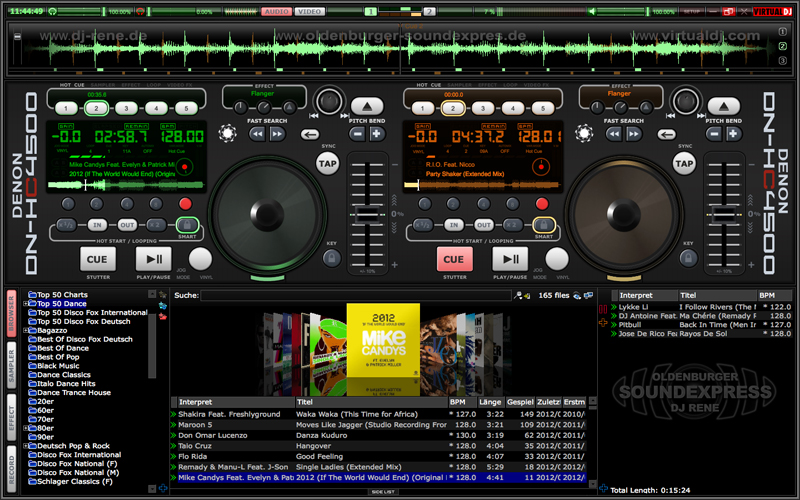
Another Picture ;-)
Posté Sun 09 Sep 12 @ 5:00 am
 kradcliffe
Why resurrect a 6 year old thread relating to a very old version of the software?
Topic Locked
Keith
Topic Locked
Keith
Posté Mon 10 Sep 12 @ 1:53 am