


 DJ VinylTouch
Once you turn off the auto stabilize options in the settings, that shouldn't be an issue.
It may be too late to change now, but I think auto stabilization should not be the default because of situations like this - it's changing previously expected behavior (e.g. a transition track could of a sudden becoming a stable track at the original BPM if trying to beatlock and play it with another track).
It may be too late to change now, but I think auto stabilization should not be the default because of situations like this - it's changing previously expected behavior (e.g. a transition track could of a sudden becoming a stable track at the original BPM if trying to beatlock and play it with another track).
Posté Sun 05 Apr 26 @ 11:16 pm
 Adion
Adion
It should turn off again when the other deck is stopped.
Also there's a new option autoBpmStabilizerMaxRange that should prevent these big changes from keeping the stabilizer locked on a bpm that's too different from the track's current bpm
Also there's a new option autoBpmStabilizerMaxRange that should prevent these big changes from keeping the stabilizer locked on a bpm that's too different from the track's current bpm
Posté Mon 06 Apr 26 @ 5:41 am
 lakis69
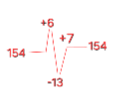
I have a song where it starts at 154 bpm, suddenly goes to 160, then drops to 147, and finally returns to 154... question... does fluid... average it at 154 or... does it go to 154, then 160 (+6), then drops to 147 (160-147 = -13) and then 154 (147+7=154)?
because when I pressed to mix the next track at 154 bpm, at that moment it caught 147 and mixed it at 147... shouldn't it mix it at 154?
I should add.. I didn't have the lock activated and on the other song on the deck I had sync activated.
with the lock active... does it play everything average 154 or... does it go 154 +6 (160) , -13 (147) , +7 (154)? because when I put the lock on the song sounded terrible
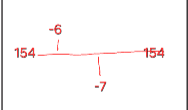
That's why I wrote above that there should be an option, for us to choose the average we want the bpm to keep... because if we set the average to 154... then it would go... 154 then 160 (+6), after 147 if it played an average of 154 it would go (+7) and not -13 (160-147-154) but (154+6=160, 160-6=154, 154-7=147, 147+7=154) so the whole song would have an average of 154
with the padlock on...
does this?...
Or this...
because when I pressed to mix the next track at 154 bpm, at that moment it caught 147 and mixed it at 147... shouldn't it mix it at 154?
I should add.. I didn't have the lock activated and on the other song on the deck I had sync activated.
with the lock active... does it play everything average 154 or... does it go 154 +6 (160) , -13 (147) , +7 (154)? because when I put the lock on the song sounded terrible
That's why I wrote above that there should be an option, for us to choose the average we want the bpm to keep... because if we set the average to 154... then it would go... 154 then 160 (+6), after 147 if it played an average of 154 it would go (+7) and not -13 (160-147-154) but (154+6=160, 160-6=154, 154-7=147, 147+7=154) so the whole song would have an average of 154
with the padlock on...
does this?...
Or this...
Posté Mon 06 Apr 26 @ 7:08 am
 groovindj
It locks at whatever the BPM is at the time you engage it, so if you lock when the BPM is 154 it will stabilize at 154 - the trouble is most of the BPM changes are invisible now. Unless it's a large change, neither the editor or the deck gives feedback to the user.
With the previous system, variations were visibile, so you could easily select an area, see the BPM and decide to lock at that tempo. Now the variations don't show and the track is made to look rigid.
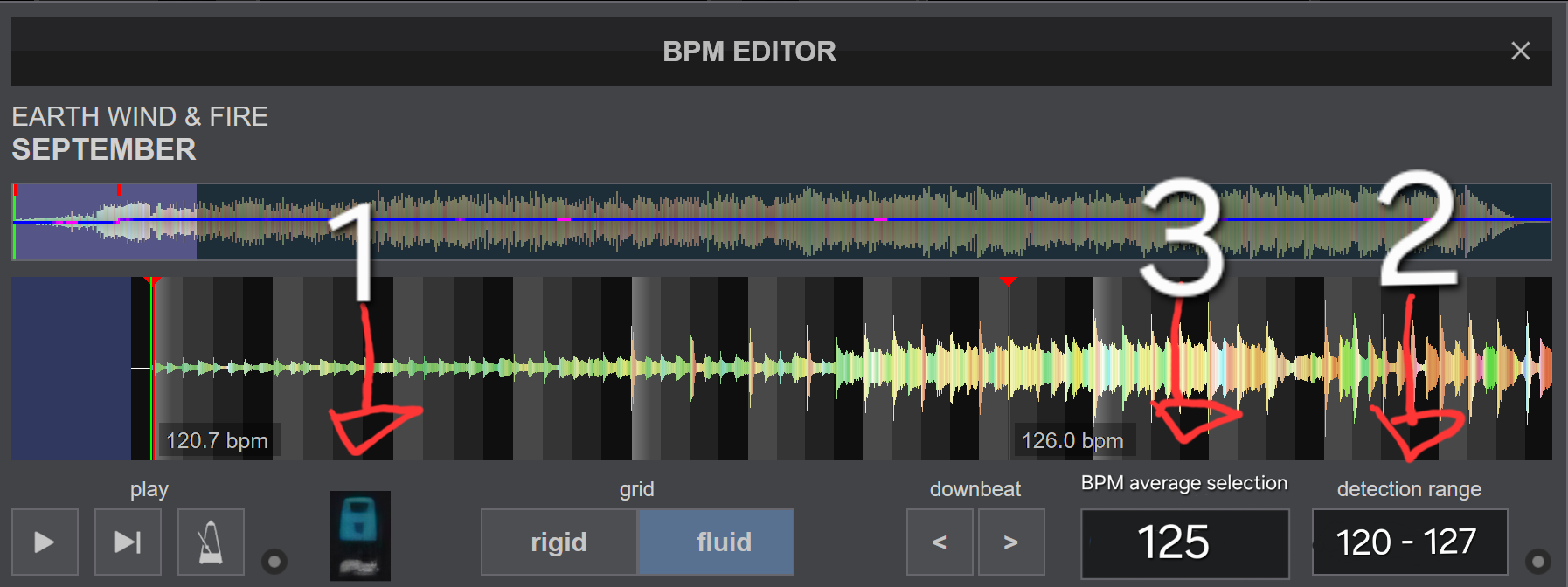
See recent EWF example where the BPM shows a constant 126 for most of the track, when it actually increases gradually.
With the previous system, variations were visibile, so you could easily select an area, see the BPM and decide to lock at that tempo. Now the variations don't show and the track is made to look rigid.
See recent EWF example where the BPM shows a constant 126 for most of the track, when it actually increases gradually.
Posté Mon 06 Apr 26 @ 9:16 am
lakis69
That's why I wrote in the wishes... that it should write the range of the song and we should choose manually by giving a value at which bpm to make the constant
Posté Mon 06 Apr 26 @ 9:46 am
 Matty1000
Should it not be the case that autostabilize would be activated on a song by song basis?
for me anyways, id have to listen to how it affects a song before i could really trust it.
I notice a lot of strange behaviour with my salsa music (it will slow down ocassionally for about half a bar)
however, there are some songs it might work fine with. I suppose funk, disco etc. might be the more common genres to use it with, but you probably wouldnt want it turned on for a rock song, or any song which has very pronounced tempo changes
for me anyways, id have to listen to how it affects a song before i could really trust it.
I notice a lot of strange behaviour with my salsa music (it will slow down ocassionally for about half a bar)
however, there are some songs it might work fine with. I suppose funk, disco etc. might be the more common genres to use it with, but you probably wouldnt want it turned on for a rock song, or any song which has very pronounced tempo changes
Posté Mon 06 Apr 26 @ 10:54 am
DJ VinylTouch
There are quantized edits of songs for every genre you mentioned, but yes its use does depend on the song and where you are trying to mix the song in.
Stabilization is based on what the actual grid looks like and what the BPM is at the point of its activation, so if it sounds off, first check the grid to see if it's correct in that area.
The per song stablize BPM is a good idea, and would probably cover stabilized export as well.
Stabilization is based on what the actual grid looks like and what the BPM is at the point of its activation, so if it sounds off, first check the grid to see if it's correct in that area.
The per song stablize BPM is a good idea, and would probably cover stabilized export as well.
Posté Mon 06 Apr 26 @ 11:06 am
 DJ Faber Zee
And bpm analysis range per song too please ✌🏾✨️
Posté Mon 06 Apr 26 @ 11:08 am
DJ VinylTouch
That's already doable in the BPM editor.
Posté Mon 06 Apr 26 @ 11:26 am
DJ Faber Zee
DJ VinylTouch wrote :
That's already doable in the BPM editor.
Yes but if you change it in the bpm editor pane, it changes the default too...
Posté Mon 06 Apr 26 @ 11:29 am
DJ VinylTouch
And that's probably okay because it's a constraint to the engine that is expected to be adjusted and used only once per song.
Just curious - what would you gain by adding a track local range for analysis?
You'd be adding an extra step of its adjustment for every song for one use and pretty much deprecating the need for a global setting.
BPM stabilization is different - every song could have potentially have a perfect BPM to be played back at, so it would be used everytime you load it and activate stabilization.
Just curious - what would you gain by adding a track local range for analysis?
You'd be adding an extra step of its adjustment for every song for one use and pretty much deprecating the need for a global setting.
BPM stabilization is different - every song could have potentially have a perfect BPM to be played back at, so it would be used everytime you load it and activate stabilization.
Posté Mon 06 Apr 26 @ 11:35 am
DJ Faber Zee
Uhm...you probably right....forget about it...the other thing I would like to have, is the evidence of bpm variations (min, max, average) in the library view as an additional column. Sorting will use minimum values.
Posté Mon 06 Apr 26 @ 11:52 am
 PhantomDeejay
The idea of the current "Fluid" engine is NOT to warp a song.
The idea is to let the song play naturally with it's naturally recorded tempo variations, and engage/lock only when needed, which is when you actually try to mix it with another song, thus minimizing the impact of the applied transformations.
The engine is also designed around the fact that a DJ would normally avoid to mix a song right on top of a transition part where a track speeds up or slows down deliberately. He would normally "wait" and try to mix on a relative steady part of the song, either before or after the transition.
That's why technically it doesn't matter much if the BPM seems to misshap at the beggining or the end of those transition parts. The scan engine tries to make sure that everything is correct in the "steady" parts.
As I said in the beggining, the intention of fluid engine is not to warp a song / iron out the CBG so that it becomes comletely rigid. Therefore it's not optimised for that. It should be used "wisely" because it's a tool designed to help you mix the odd track here and there that drifts, or has a suddent BPM change.
Finally, while as a DJ that's also a "computer guy" (that's also an Engineer) I understand the desire to see the BPM fluactations, I can't help it but agree with how the program actually handles and shows them.
It kind of reminds me why car manufacturers removed oil pressure gauge from cars..
Because people were getting too fixated on a thing that didn't really matter the way people think it did..
Frankly, all this years we have witnessed a lot of complains from users because we show BPM with two decimal digits instead of one and people perceive this as LESS accurate!
Imagine the average DJ seeing his BPM going up/down all the time..
He would really panic.
A line had to be drawn somewhere. Maybe the conditions to change BPM readout are less sensitive than some people (or even I) would like. But I totally understand that and stand by that.
Instead of getting fixated on what number the BPM-o-meter :P says, just try to close your eyes and mix the songs when you feel they can be mixed..
And let the software do it's magic!
If it fails, then come back and tell us.. And we'll take a further look.
The idea is to let the song play naturally with it's naturally recorded tempo variations, and engage/lock only when needed, which is when you actually try to mix it with another song, thus minimizing the impact of the applied transformations.
The engine is also designed around the fact that a DJ would normally avoid to mix a song right on top of a transition part where a track speeds up or slows down deliberately. He would normally "wait" and try to mix on a relative steady part of the song, either before or after the transition.
That's why technically it doesn't matter much if the BPM seems to misshap at the beggining or the end of those transition parts. The scan engine tries to make sure that everything is correct in the "steady" parts.
As I said in the beggining, the intention of fluid engine is not to warp a song / iron out the CBG so that it becomes comletely rigid. Therefore it's not optimised for that. It should be used "wisely" because it's a tool designed to help you mix the odd track here and there that drifts, or has a suddent BPM change.
Finally, while as a DJ that's also a "computer guy" (that's also an Engineer) I understand the desire to see the BPM fluactations, I can't help it but agree with how the program actually handles and shows them.
It kind of reminds me why car manufacturers removed oil pressure gauge from cars..
Because people were getting too fixated on a thing that didn't really matter the way people think it did..
Frankly, all this years we have witnessed a lot of complains from users because we show BPM with two decimal digits instead of one and people perceive this as LESS accurate!
Imagine the average DJ seeing his BPM going up/down all the time..
He would really panic.
A line had to be drawn somewhere. Maybe the conditions to change BPM readout are less sensitive than some people (or even I) would like. But I totally understand that and stand by that.
Instead of getting fixated on what number the BPM-o-meter :P says, just try to close your eyes and mix the songs when you feel they can be mixed..
And let the software do it's magic!
If it fails, then come back and tell us.. And we'll take a further look.
Posté Mon 06 Apr 26 @ 12:01 pm
groovindj
I'm making the request for the BPM variations to be shown, so that it's easy for users to see whether a track is varying or not, rather than hiding it from them and making it look rigid.
I'd compare the BPM readout to be more like a car speedometer than an oil gauge. It's the speed of the track. For mixing DJs it's one of the most essential things.
As I've said elsewhere, the vast majority of skins out there do not have the little tilde marker or the padlock on the decks (and may never get updated) so IMO it makes sense for the variations to be shown via the BPM readout.
Historically this was the way it was done with analogue BPM counters that "listened" to the music. The DJ could always see exactly what the BPM was at any time/any part of the track.
It's also an issue when it comes to knowing whether a track is being stabilized or not. In the earlier builds it was clearly visible because the BPM readout was steady. Now it's steady even when the track is varying.
I can learn to live with it if it's not reverted, and I can always use the earlier build to analyse instead, but I would prefer for the variations not to be hidden. Perhaps we could be given a choice? 👍
I'd compare the BPM readout to be more like a car speedometer than an oil gauge. It's the speed of the track. For mixing DJs it's one of the most essential things.
As I've said elsewhere, the vast majority of skins out there do not have the little tilde marker or the padlock on the decks (and may never get updated) so IMO it makes sense for the variations to be shown via the BPM readout.
Historically this was the way it was done with analogue BPM counters that "listened" to the music. The DJ could always see exactly what the BPM was at any time/any part of the track.
It's also an issue when it comes to knowing whether a track is being stabilized or not. In the earlier builds it was clearly visible because the BPM readout was steady. Now it's steady even when the track is varying.
I can learn to live with it if it's not reverted, and I can always use the earlier build to analyse instead, but I would prefer for the variations not to be hidden. Perhaps we could be given a choice? 👍
Posté Mon 06 Apr 26 @ 12:37 pm
DJ VinylTouch
But @groovindj aren't the shifts displayed in deck info display?
It's only the Jog display that keeps the stability value, and tbh that's the truth of what's happening on playback if the deck is stabilized (the BPM is kept steady).
It's only the Jog display that keeps the stability value, and tbh that's the truth of what's happening on playback if the deck is stabilized (the BPM is kept steady).
Posté Mon 06 Apr 26 @ 12:52 pm
groovindj
I've not seen them displayed elsewhere - even in the editor, many tracks now just show one anchor, one BPM and a straight blue line. Yes there are sometimes red areas, but even if you zoom in on those areas, it doesn't always show you a BPM value there.
I had a track recently where I had to place anchors manually throughout, as the analysis couldn't understand it (Hugh Masekela - Grazing In The Grass) and if you do that, you get a readout when it passes the anchor - but surely the idea now is to avoid manually placing anchors?
I had a track recently where I had to place anchors manually throughout, as the analysis couldn't understand it (Hugh Masekela - Grazing In The Grass) and if you do that, you get a readout when it passes the anchor - but surely the idea now is to avoid manually placing anchors?
Posté Mon 06 Apr 26 @ 1:02 pm
PhantomDeejay
groovindj wrote :
I'm making the request for the BPM variations to be shown, so that it's easy for users to see whether a track is varying or not, rather than hiding it from them and making it look rigid.
I know what you're asking.
groovindj wrote :
I'd compare the BPM readout to be more like a car speedometer than an oil gauge. It's the speed of the track. For mixing DJs it's one of the most essential things.
Sure, but does it matter if it's 125.87 or 126.34 ?
You are not going to match the numbers anyway. You are going to use an automation system that will match them for you. So, does it really matter if the track is fluactating between 125 and 127 BPM ?
It's less than 2% variation that will be taken care automatically eitherway..
groovindj wrote :
As I've said elsewhere, the vast majority of skins out there do not have the little tilde marker or the padlock on the decks (and may never get updated) so IMO it makes sense for the variations to be shown via the BPM readout.
Yes, but then again you have users "screaming" all the time because while their sound is "steady" they see their pitch or BPM value change slightly when using DVS and they are going nuts.. (you certainly understand what I mean, you have been a regular member in these forums for too many years)
groovindj wrote :
Historically this was the way it was done with analogue BPM counters that "listened" to the music. The DJ could always see exactly what the BPM was at any time/any part of the track.
Really ?
They were so slow that they were giving you an estimated guess. Nothing more. And their precision for anything other than house music was always questionable. If you find using a "live" BPM meter to be good enough for you, then definitely the fluid engine, despite "hiding" the variations is hundreds of magnitude more reliable on the readout it provides..
groovindj wrote :
It's also an issue when it comes to knowing whether a track is being stabilized or not. In the earlier builds it was clearly visible because the BPM readout was steady. Now it's steady even when the track is varying.
Was it ?
So yes, when you were seeing the BPM fluctuating you knew it was not steady. But the opposite didn't meant that the track was stabilized. It could be stabilized, or it could simply be stable.
Remember, one of the reasons that it was removed was that (because this is a computer after all) in order to fix a misplaced CBG marker the BPM could "artificially" do wild jumps.
groovindj wrote :
I can learn to live with it if it's not reverted, and I can always use the earlier build to analyze instead, but I would prefer for the variations not to be hidden. Perhaps we could be given a choice? 👍
As I said, I would prefer a bigger sensitivity myself, but I 100% understand that it's less sensitive than I would like personally.
People should no longer care for the BPM "numbers" and fluctuation as long as the numbers are close enough.
You and I do care about the numbers because we did that for the whole of our careers and it's muscle memory to us. But if we want to use this tool then we should care less..
And please remember.. We were able to mix those "non rigid" songs before fluid ever existed, with a BPM that was just an estimation of the total track. I'm sure we can also mix them now even if BPM displayed value is not 100% accurate. :)
Posté Mon 06 Apr 26 @ 1:24 pm
PhantomDeejay
groovindj wrote :
I've not seen them displayed elsewhere - even in the editor, many tracks now just show one anchor, one BPM and a straight blue line. Yes there are sometimes red areas, but even if you zoom in on those areas, it doesn't always show you a BPM value there.
That's because the BPM doesn't really change. It's the phase changes that cause the red areas.
At least that's the case on the tracks I checked myself.
If you have any track that has a significant BPM change that's not displayed, feel free to share! :)
Posté Mon 06 Apr 26 @ 1:30 pm
DJ Faber Zee
@phantom
When I DJ, I never mix two tracks with more than a 5 BPM difference. That’s why having the BPM variation clearly visible is important to me. If a track starts at 120 and gradually rises to 125, I need to know that in advance, because it directly impacts how I approach the mix.
That said, FLUID beatgrid is a real game changer and it’s already working incredibly well. I’m just sharing a few minor suggestions that could add further clarity and potentially benefit the wider community, not just my own workflow.
When I DJ, I never mix two tracks with more than a 5 BPM difference. That’s why having the BPM variation clearly visible is important to me. If a track starts at 120 and gradually rises to 125, I need to know that in advance, because it directly impacts how I approach the mix.
That said, FLUID beatgrid is a real game changer and it’s already working incredibly well. I’m just sharing a few minor suggestions that could add further clarity and potentially benefit the wider community, not just my own workflow.
Posté Mon 06 Apr 26 @ 1:48 pm
lakis69
All I wanted... is if a "lock" could be added to the BPM editor so that when we want to permanently lock the fluid... it's annoying to have to remember to press the lock all the time.
Posté Mon 06 Apr 26 @ 2:09 pm
