


 DeejayHawkeye
On my old controller DDJ-SX2, I routed the sampler output to channel 3 so I could adjust the bass and treble. It was possible to pre-listen to the sampler on channel 3. On my new controller DDj-FLX10, I’ve done the same, but I can’t hear any thing on channel 3. Is that not possible on the FLX10 because of the hardware mixer?
I have routed the sampler output in the skin gui - pad menu. Should i revert it and route the sampler in audio settings instead?
I have routed the sampler output in the skin gui - pad menu. Should i revert it and route the sampler in audio settings instead?
Posté Mon 22 Dec 25 @ 1:47 pm
 kradcliffe
FLX10 isn't a hardware mixer. Try adding it to the audio config.
Posté Mon 22 Dec 25 @ 2:16 pm
 DJ VinylTouch
The DDJ-SX2, from the Hardware Manual has an internal mixer setup as well, so it's not clear exactly what was being described here.
Additionally, the default setup should be sufficient to preview the Sampler audio - the DDJ-FLX10 has a Sampler cue button.
Additionally, the default setup should be sufficient to preview the Sampler audio - the DDJ-FLX10 has a Sampler cue button.
Posté Mon 22 Dec 25 @ 2:36 pm
DeejayHawkeye
kradcliffe wrote :
FLX10 isn't a hardware mixer. Try adding it to the audio config.
Sorry. Lost in translation :-) Ofcourse FLX10 isnt a hardware mixer. But i cant route sampler in audioconfig to only chan 3.
Posté Mon 22 Dec 25 @ 2:52 pm
DJ VinylTouch
But the question still is why you are trying to do that/what are you trying to do, given this is true:
And you said this
The Sampler Cue on the DDJ-FLX10 allows you to listen to the Sampler in your headphones when toggled, so is it that you want to route that to somewhere else for listening?
DJ VinylTouch wrote :
Additionally, the default setup should be sufficient to preview the Sampler audio - the DDJ-FLX10 has a Sampler cue button.
Additionally, the default setup should be sufficient to preview the Sampler audio - the DDJ-FLX10 has a Sampler cue button.
And you said this
DeejayHawkeye wrote :
On my old controller DDJ-SX2, I routed the sampler output to channel 3 so I could adjust the bass and treble. It was possible to pre-listen to the sampler on channel 3.
The Sampler Cue on the DDJ-FLX10 allows you to listen to the Sampler in your headphones when toggled, so is it that you want to route that to somewhere else for listening?
Posté Mon 22 Dec 25 @ 2:57 pm
DeejayHawkeye
DJ VinylTouch wrote :
The DDJ-SX2, from the Hardware Manual has an internal mixer setup as well, so it's not clear exactly what was being described here.
Additionally, the default setup should be sufficient to preview the Sampler audio - the DDJ-FLX10 has a Sampler cue button.
Additionally, the default setup should be sufficient to preview the Sampler audio - the DDJ-FLX10 has a Sampler cue button.
I have the the default setup and i know it has a Sampler cue button, but as i describe, i have routed the sampler output to chan 3 to adjust low and high. I cant pfl the sampler on chan3 or Sampler pfl.
Sampler is playing on master, i can adjust low, high and level and vu meter on chan 3 is vissible.
Posté Mon 22 Dec 25 @ 2:58 pm
DJ VinylTouch
Ok so you want the ability to use the 3-band EQ of the mixer section of one channels on the sampler?
Posté Mon 22 Dec 25 @ 3:01 pm
DeejayHawkeye
Yes that is correct and it works perfect, BUT i cant pfl the sampler. On my old SX2 it works when i press the pfl button on chan 3 but not on my FLX10. Same routing settings but no pfl on chanel 3 or sampler pfl. Samplersound out on the master working.
Posté Mon 22 Dec 25 @ 3:07 pm
DJ VinylTouch
Does it work if you use the dedicated sample cue button at all?
I don't think the DDJ-SX2 had a dedicated sampler cue so that's definitely a more obvious difference on first glance.
I don't think the DDJ-SX2 had a dedicated sampler cue so that's definitely a more obvious difference on first glance.
Posté Mon 22 Dec 25 @ 3:10 pm
 djdad
djdad
when routing Sampler to a Deck with Master & Headphones, e.g. on Deck 3 and need to apply software EQ, you need to have checked "Apply Deck Effects" as per the following image...
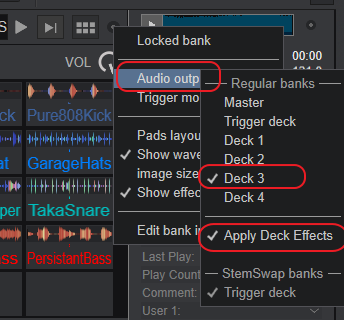
For prelisten. The PFL_SAMPLER key on FLX10 (Nr.17 in our Manual) is mapped to toggle the setting SamplerHeadphones, but will not do anything if Sampler is assigned to a Deck.
But you should be able to prelisten Sampler in Headphones if the PFL button is enabled on Deck 3. You dont ?
PS. Don't add Sampler in your Audio setup, leave it to just Master & Headphones. the routing is done from within VDJ Sampler Options as shown in the pic above.
For prelisten. The PFL_SAMPLER key on FLX10 (Nr.17 in our Manual) is mapped to toggle the setting SamplerHeadphones, but will not do anything if Sampler is assigned to a Deck.
But you should be able to prelisten Sampler in Headphones if the PFL button is enabled on Deck 3. You dont ?
PS. Don't add Sampler in your Audio setup, leave it to just Master & Headphones. the routing is done from within VDJ Sampler Options as shown in the pic above.
Posté Mon 22 Dec 25 @ 3:38 pm
DeejayHawkeye
I have all this setting as you describe. I can only hear the Sampler pfl when the fader on the chan 3 is up
Posté Mon 22 Dec 25 @ 4:19 pm
DeejayHawkeye
The Sampler pfl is post-fader not pre-fader.
Posté Mon 22 Dec 25 @ 8:19 pm
DJ VinylTouch
That isn't true given you are not using the Sampler in per-deck/Stem Swap mode for the bank.
Posté Mon 22 Dec 25 @ 9:46 pm
DeejayHawkeye
That's how it works now and it shouldn't be like that.
Posté Tue 23 Dec 25 @ 6:20 am
DeejayHawkeye
Is there any solution to the problem that not allows you to pfl the sampler pre fader on the DDJ-FLX10?
It works on DDJ-SX2
It works on DDJ-SX2
Posté Tue 30 Dec 25 @ 8:51 am
 Adion
Adion
Either disable 'Apply Deck Effects', or set 'fxProcessing' to 'Pre-Fader'
Posté Tue 30 Dec 25 @ 9:08 am
DeejayHawkeye
When I disable “Apply Deck Effects”, I can 'pfl pre fader' the sample, but naturally there is no VU meter and I can’t adjust the highs and lows. So I can’t disable “Apply Deck Effects”. I assume the internal routing and the hardware in the FLX10 doesn’t allow PFL pre-fader and doesn’t work the same way as it does on the DDJ-SX2. Maybe can @phantomdeejay confirm?
Posté Tue 30 Dec 25 @ 8:10 pm