


 MacGyverGear
After some questions about how to enlarge the Fonts for .LRC files, which didn't bring any answhers yet I'm attempting here. Perhaps it's more kind of a Video Discussion?
I did found some topics about users and explaining about the Video Editor and how they use it. Seems a perfect fix. :-) But I can't find the "Lyric Overlay" button in my Video Editor.
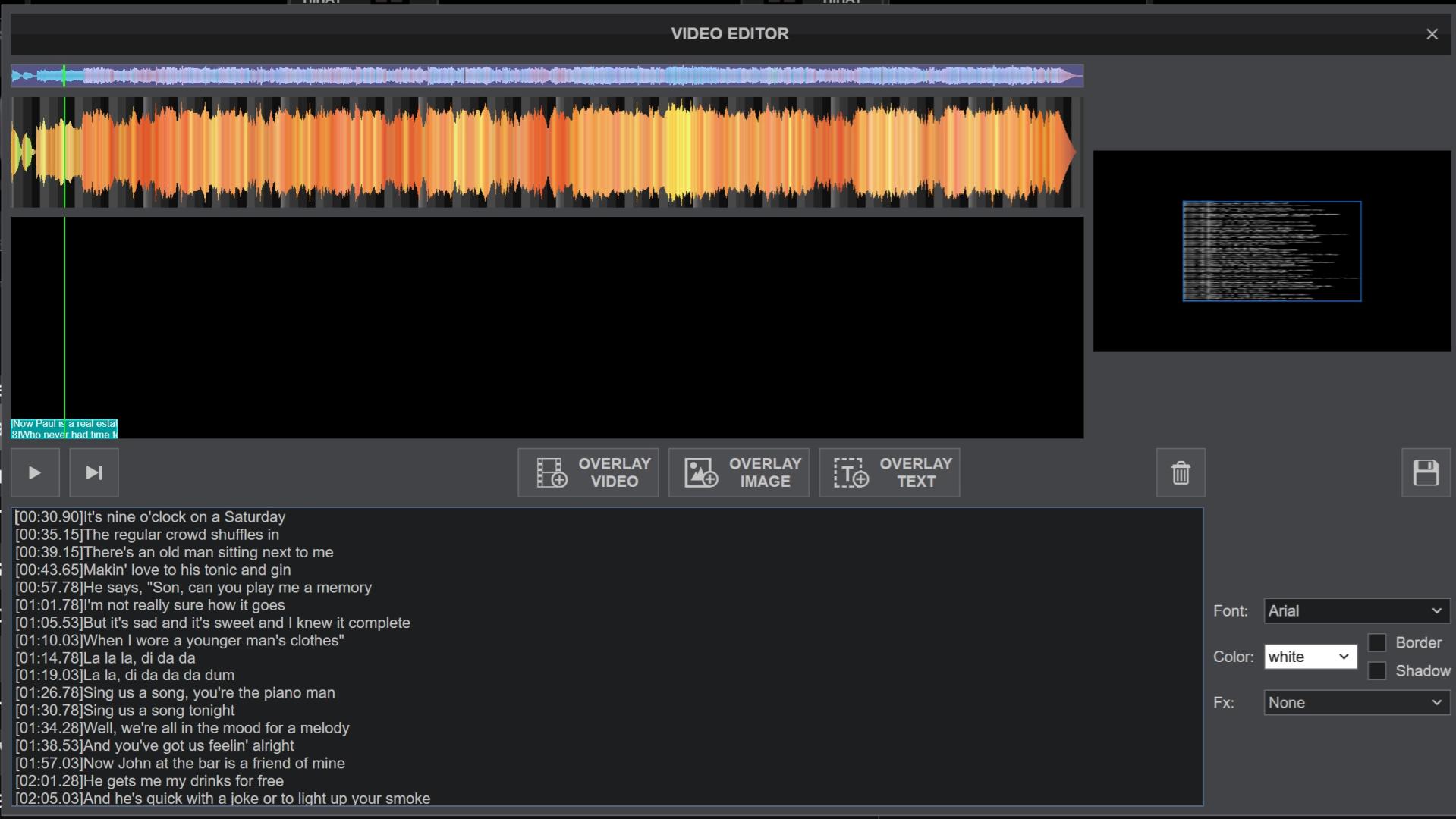
Reffering to this topic it once was available. https://virtualdj.com/forums/236163/Wishes_and_new_features/Karaoke_lyrics_overlay_on_top_layer.html
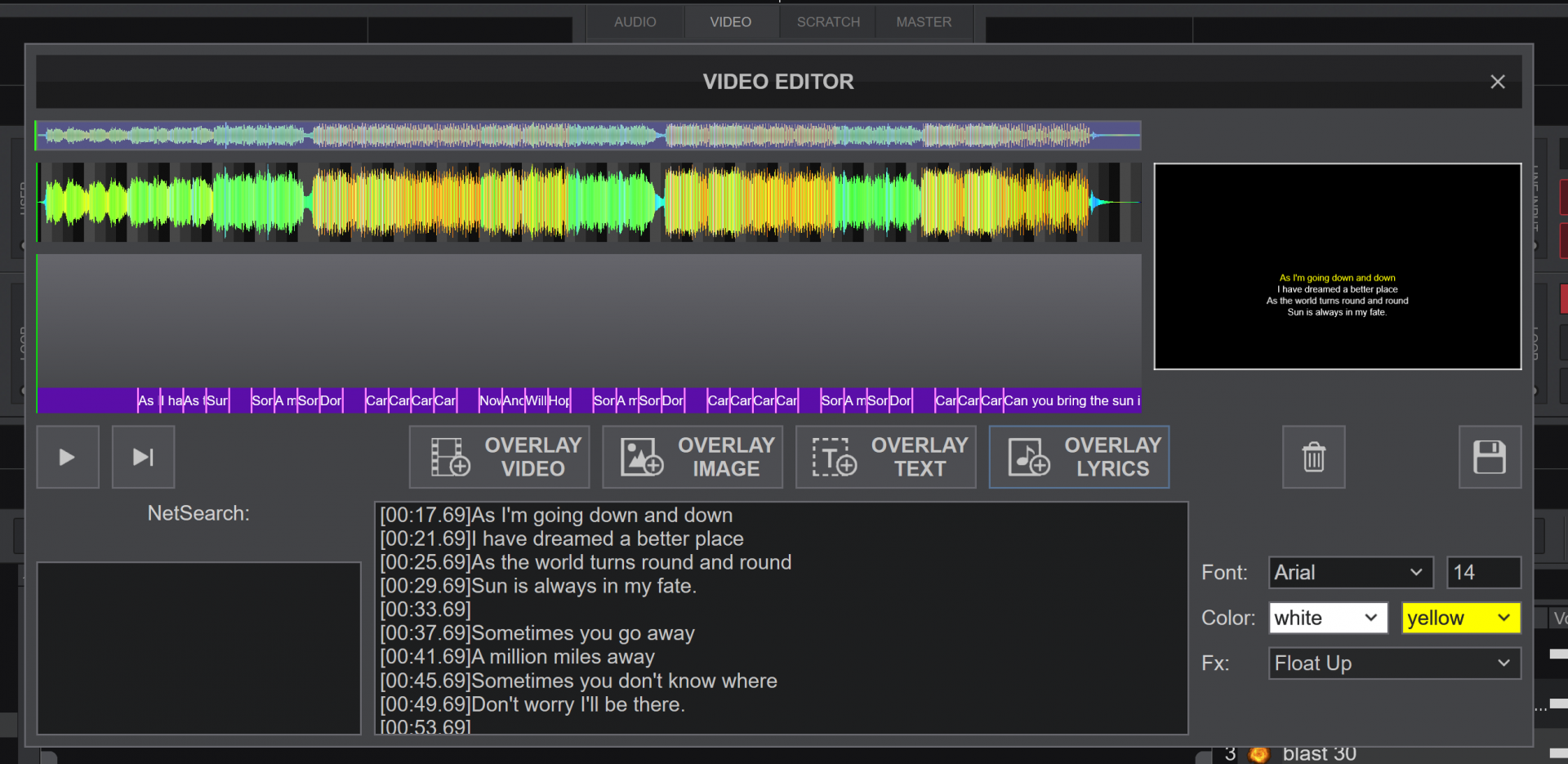
Thanks in advance. :-)
I did found some topics about users and explaining about the Video Editor and how they use it. Seems a perfect fix. :-) But I can't find the "Lyric Overlay" button in my Video Editor.
Reffering to this topic it once was available. https://virtualdj.com/forums/236163/Wishes_and_new_features/Karaoke_lyrics_overlay_on_top_layer.html
Thanks in advance. :-)
Posté Mon 17 Aug 26 @ 3:06 pm
 Adion
Adion
This has been replaced with the Lyrics Editor (alongside the Karaoke and Lyrics plugins)
Posté Mon 17 Aug 26 @ 3:16 pm
MacGyverGear
Ok, thanks..
I found out about the Lyric function and managed to paste the .LRC timestamped text. But text is still a bit hard to read. And with larger fonts, words sometimes overlap.
Ideally I would like the .LRC format screen but in a less taller version, so it doesn't occupies my complete playlist. When I wide up the LRC screen the Font will stay in the same size.
I actually just found about the Video Editor. But this was my orignal question: https://virtualdj.com/forums/269801/General_Discussion/How_to_enlarge_Fontsize_for_.lrc_files_in_the_Master_Video_Output_window.html
I don't use a separate Video Overlay on a screen so it's only for for private view. ;-)
I found out about the Lyric function and managed to paste the .LRC timestamped text. But text is still a bit hard to read. And with larger fonts, words sometimes overlap.
Ideally I would like the .LRC format screen but in a less taller version, so it doesn't occupies my complete playlist. When I wide up the LRC screen the Font will stay in the same size.
I actually just found about the Video Editor. But this was my orignal question: https://virtualdj.com/forums/269801/General_Discussion/How_to_enlarge_Fontsize_for_.lrc_files_in_the_Master_Video_Output_window.html
I don't use a separate Video Overlay on a screen so it's only for for private view. ;-)
Posté Mon 17 Aug 26 @ 3:47 pm
MacGyverGear
Found out how to display the lyrics a bit clearer. 'Beats' for waveform gives a much easier to read contrast. :-)
I gave it a try in this video. https://youtu.be/2FT98zzzh0M
I manually time-mark the lines in my .LRC files. But when I paste them in the AI lyric (together with the time information, they're still a bit off.
The problem with these instrumental files is that they don't contain vocals also maybe?
I gave it a try in this video. https://youtu.be/2FT98zzzh0M
I manually time-mark the lines in my .LRC files. But when I paste them in the AI lyric (together with the time information, they're still a bit off.
The problem with these instrumental files is that they don't contain vocals also maybe?
Posté Mon 17 Aug 26 @ 4:14 pm
 freppa
Adion wrote :
This has been replaced with the Lyrics Editor (alongside the Karaoke and Lyrics plugins)
Does Karaoke and Lyrics read .lrc files or can I delete all my lrc files and re scan ?
Posté Mon 17 Aug 26 @ 5:12 pm
MacGyverGear
As far as I've discovered in non karaoke tracks, they're added automatically. It extracts the lyrics from the Vocal part in the Stems. But this doesn't happen to instrumental Karaoke Tracks for that same reason (since it contains no vocals). Background vocals will be recognised though.
I had to copy and paste the .lrc time stamped verses manually, but even then, they seem to pretty much off compared to my .lrc timing. :-(
Hopefully I'm doing something wrong.
I had to copy and paste the .lrc time stamped verses manually, but even then, they seem to pretty much off compared to my .lrc timing. :-(
Hopefully I'm doing something wrong.
Posté Mon 17 Aug 26 @ 5:22 pm
VeksCZ
Hi everybody,
I have some experiments. :)
https://github.com/VeksCZ/VirtualDJEmbeddedLyrics
I would appreciate help on developing own lyrics plugin and implement everything we need. First version is working but needs improvements.
You can try it.
I have some experiments. :)
https://github.com/VeksCZ/VirtualDJEmbeddedLyrics
I would appreciate help on developing own lyrics plugin and implement everything we need. First version is working but needs improvements.
You can try it.
Posté Tue 01 Sep 26 @ 1:07 pm
MacGyverGear
VeksCZ wrote :
Hi everybody,
I have some experiments. :)
https://github.com/VeksCZ/VirtualDJEmbeddedLyrics
I would appreciate help on developing own lyrics plugin and implement everything we need. First version is working but needs improvements.
You can try it.
I have some experiments. :)
https://github.com/VeksCZ/VirtualDJEmbeddedLyrics
I would appreciate help on developing own lyrics plugin and implement everything we need. First version is working but needs improvements.
You can try it.
Looks interesting. But how do I install it? I found a .DLL file but I have no idea in which folder the rest of the files, nor the .DLL file needs to be located.
Posté Sun 06 Sep 26 @ 10:01 pm
VeksCZ
MacGyverGear wrote :
Looks interesting. But how do I install it? I found a .DLL file but I have no idea in which folder the rest of the files, nor the .DLL file needs to be located.
VeksCZ wrote :
Hi everybody,
I have some experiments. :)
https://github.com/VeksCZ/VirtualDJEmbeddedLyrics
I would appreciate help on developing own lyrics plugin and implement everything we need. First version is working but needs improvements.
You can try it.
I have some experiments. :)
https://github.com/VeksCZ/VirtualDJEmbeddedLyrics
I would appreciate help on developing own lyrics plugin and implement everything we need. First version is working but needs improvements.
You can try it.
Looks interesting. But how do I install it? I found a .DLL file but I have no idea in which folder the rest of the files, nor the .DLL file needs to be located.
I have added instalator and Mac version as well. Try it please and let me know.
Posté Tue 08 Sep 26 @ 2:15 pm
MacGyverGear
Hi, I succeeded to install it. The text in the command prompt was really helpful. Great work!!
The first .lrc tracks I tested, where much better to read. Perfect!! But I've noticed the lyrics are only visble in the Master Video, as an overlay. Is it also possible to output in the Deck Previews?
After I found out how to still create .vdjedit files (with lyrics), my original question actually. I modified my skin so I now can elarge the Video Preview in a Deck by a shortkey, whenever I lost my lyrics.. It then fully cover my player. In the time I was using .LRC files I always had to enlarge the Pop up Video window, and drag it to everywhere.. hahaha..
My original complaint was actually the small fonts. But that's all solved with your plugin. :-)
But in some usercases you also would like to keep your lyrics private maybe? You would still being able to make use of a Visual or a Shader on a separate screen then.. https://youtu.be/d4N5h1W7bnc
The first .lrc tracks I tested, where much better to read. Perfect!! But I've noticed the lyrics are only visble in the Master Video, as an overlay. Is it also possible to output in the Deck Previews?
After I found out how to still create .vdjedit files (with lyrics), my original question actually. I modified my skin so I now can elarge the Video Preview in a Deck by a shortkey, whenever I lost my lyrics.. It then fully cover my player. In the time I was using .LRC files I always had to enlarge the Pop up Video window, and drag it to everywhere.. hahaha..
My original complaint was actually the small fonts. But that's all solved with your plugin. :-)
But in some usercases you also would like to keep your lyrics private maybe? You would still being able to make use of a Visual or a Shader on a separate screen then.. https://youtu.be/d4N5h1W7bnc
Posté Tue 08 Sep 26 @ 8:00 pm
VeksCZ
MacGyverGear wrote :
Hi, I succeeded to install it. The text in the command prompt was really helpful. Great work!!
The first .lrc tracks I tested, where much better to read. Perfect!! But I've noticed the lyrics are only visble in the Master Video, as an overlay. Is it also possible to output in the Deck Previews?
After I found out how to still create .vdjedit files (with lyrics), my original question actually. I modified my skin so I now can elarge the Video Preview in a Deck by a shortkey, whenever I lost my lyrics.. It then fully cover my player. In the time I was using .LRC files I always had to enlarge the Pop up Video window, and drag it to everywhere.. hahaha..
My original complaint was actually the small fonts. But that's all solved with your plugin. :-)
But in some usercases you also would like to keep your lyrics private maybe? You would still being able to make use of a Visual or a Shader on a separate screen then.. https://youtu.be/d4N5h1W7bnc
The first .lrc tracks I tested, where much better to read. Perfect!! But I've noticed the lyrics are only visble in the Master Video, as an overlay. Is it also possible to output in the Deck Previews?
After I found out how to still create .vdjedit files (with lyrics), my original question actually. I modified my skin so I now can elarge the Video Preview in a Deck by a shortkey, whenever I lost my lyrics.. It then fully cover my player. In the time I was using .LRC files I always had to enlarge the Pop up Video window, and drag it to everywhere.. hahaha..
My original complaint was actually the small fonts. But that's all solved with your plugin. :-)
But in some usercases you also would like to keep your lyrics private maybe? You would still being able to make use of a Visual or a Shader on a separate screen then.. https://youtu.be/d4N5h1W7bnc
If AI was not bluffing, plugins cannot send video to decks preview. I have asked for that several times with no success. Only master. I have released several new versions with more options, try it and keep mu updated what should I change.
Posté Tue 22 Sep 26 @ 5:58 pm