


 Stephane Clavel
Since the [NEWS] thread is locked, feel free to post here your first impressions or comments.
Posté Tue 17 Feb 26 @ 11:28 pm
 DJ VinylTouch
Quick questions about the Variable BPM part of the update (great work btw!!! it's worked well for all the tracks I held back on manually gridding):
- Is there any minimum requirements to use the new analysis? Is it based on Stem 1.0 or Stem 2.0 analysis requirements?
- I noticed that the new analysis takes quite a bit of time on my M1 MacBook (like about 30+ seconds). Given all the new analysis potentially all happening upfront on song load (Lyrics, Stems and now new Beatgrid analysis), what kind of max load/average wait times are we expecting here, especially if we are trying to do things that are intensive (e.g. play video, livestream direct, broadcast to radio)? Also, would the analysis be piecemeal like stems analysis, so the track is usable with some subportion of the grid immediately (like the stem analysis), or will it have to be completely computed before use?
- Is reanalyze "multi" deprecated now or is it an alias to reanalyze variable?
- Is the BPM stabilizer based on the Master Deck BPM? Or it is based on the last BPM experienced in the display?
My take on it was it would work with the current BPM displayed for the deck but it doesn't seem to work for me (I tried it with the deck by itself, and with the deck synced to another deck, with the bpm_stabilizer verb) - Is there a way to export the stabilized track?
Basically a way to create a quantized edit for others, or for CDJ Export/standalone usage, which could prove very useful
Posté Wed 18 Feb 26 @ 12:51 am
Stephane Clavel
- it's not "based on stems", it's a new AI, but the requirement to run it on GPU are the same as stems2.0
- it has to analyze all the song before giving the grid
- "multi-zones" is only used on songs >15mn
- BPM Stabilizer is not based on the other deck. you can activate it on a track that is loaded on a single deck. It will "lock" the current BPM of the variable track, so that the BPM stops to vary.
- yes it's coming
- it has to analyze all the song before giving the grid
- "multi-zones" is only used on songs >15mn
- BPM Stabilizer is not based on the other deck. you can activate it on a track that is loaded on a single deck. It will "lock" the current BPM of the variable track, so that the BPM stops to vary.
- yes it's coming
Posté Wed 18 Feb 26 @ 1:06 am
DJ VinylTouch
Thank you for the quick responses 🙏🏾..I'll try again with the bpm_stablize verb, I must have made a mistake somewhere in using it (the BPM varied in the display regardless when I tried).
Is there also going to be a way to batch-analyze files with it as well?
I'd like to just drop a set of tracks with varying BPMs in a list folder and let it go to work.
Also, given the requirement is the same as Stems 2.0, what will happen in the case of machines that do not meet its requirements?
Is there also going to be a way to batch-analyze files with it as well?
I'd like to just drop a set of tracks with varying BPMs in a list folder and let it go to work.
Also, given the requirement is the same as Stems 2.0, what will happen in the case of machines that do not meet its requirements?
Posté Wed 18 Feb 26 @ 1:13 am
Stephane Clavel
the bpm stabilizer is accessed with the small lock icon that will appear near the bpm display if a track is set to variable BPM.
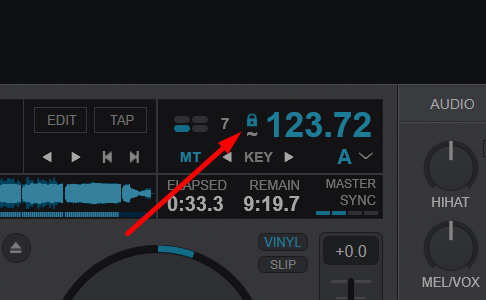
and about if a computer doesnt meet the requirement, same as stems2, it will then run the AI on the CPU (so it's slower, but still useable)
and about if a computer doesnt meet the requirement, same as stems2, it will then run the AI on the CPU (so it's slower, but still useable)
Posté Wed 18 Feb 26 @ 1:18 am
DJ VinylTouch
Stephane Clavel wrote :
the bpm stabilizer is accessed with the small lock icon that will appear near the bpm display if a track is set to variable BPM.
So I think that only displays with the default skin currently, so that's why I ended up using the verb mentioned.
Posté Wed 18 Feb 26 @ 1:34 am
 Yan Duval
Thanks, great feature!
Posté Wed 18 Feb 26 @ 1:55 am
 kradcliffe
One thing I noticed is that when setting an intro loop with variable BPM it locks to the correct beat, but doing the same with stabiliser enabled it moved the loop "off beat" per example 2 below:
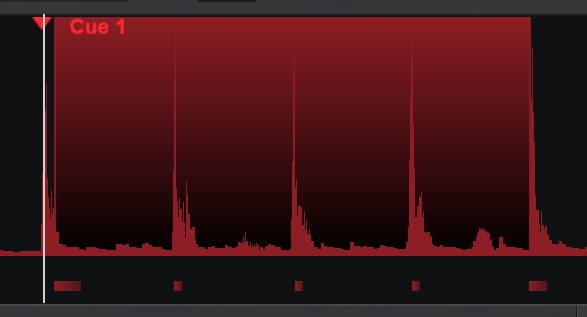
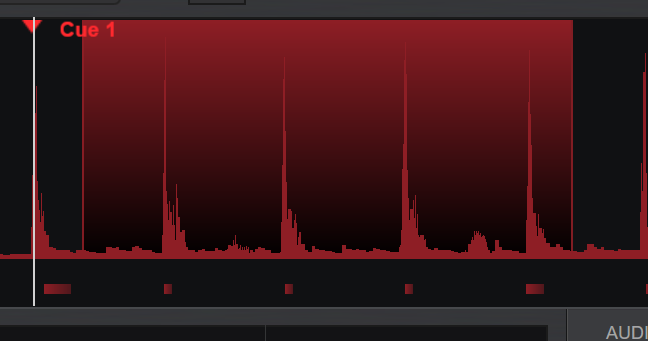
Posté Wed 18 Feb 26 @ 7:05 am
 DJ Faber Zee
Whoa… what amazing news to wake up to.
I’m really looking forward to the official release, but I do have one question.
Will this feature address the long-standing issue with cue point and loop inaccuracies on Rekordbox-imported tracks?
For those unfamiliar, this is a very frustrating problem that occurs when VDJ reads cue points and loops from Rekordbox. In about 99% of cases, they end up slightly misaligned by a few milliseconds compared to the original Rekordbox data.
With large Rekordbox libraries, it’s simply not realistic to manually correct every imported cue point and loop inside VDJ, which makes this issue even more critical.
Thanks VDJ FAM!
I’m really looking forward to the official release, but I do have one question.
Will this feature address the long-standing issue with cue point and loop inaccuracies on Rekordbox-imported tracks?
For those unfamiliar, this is a very frustrating problem that occurs when VDJ reads cue points and loops from Rekordbox. In about 99% of cases, they end up slightly misaligned by a few milliseconds compared to the original Rekordbox data.
With large Rekordbox libraries, it’s simply not realistic to manually correct every imported cue point and loop inside VDJ, which makes this issue even more critical.
Thanks VDJ FAM!
Posté Wed 18 Feb 26 @ 8:11 am
 djspaceyuk
what is the limit of AI Visual Generations per month I'm on pro infinity licence
Posté Wed 18 Feb 26 @ 8:37 am
 PhantomDeejay
4 Generations on a 30 days rolling window
Posté Wed 18 Feb 26 @ 9:07 am
 RobRoy
PhantomDeejay wrote :
4 Generations on a 30 days rolling window
at least for the free ones, but you can buy some additional credits if needed or choose some from the provided libary
Posté Wed 18 Feb 26 @ 9:28 am
 jeromeip
Very happy with this new feature in VDJ 🚀✨
Is there a way to identify tracks with multiple BPMs? When loaded on a deck and/or when displayed in browser?
(I'm thinking here of tracks with really different BPMs during the track, not those with irregular beat)
When seeking for "matching" tracks (based on key & BPM), is VDJ taking into account tracks containing a part matching the reference BPM?
Is there a way to identify tracks with multiple BPMs? When loaded on a deck and/or when displayed in browser?
(I'm thinking here of tracks with really different BPMs during the track, not those with irregular beat)
When seeking for "matching" tracks (based on key & BPM), is VDJ taking into account tracks containing a part matching the reference BPM?
Posté Wed 18 Feb 26 @ 10:46 am
 serieB
I updated this morning to the latest early access (VDJ2026 Part 2) and I can’t find how to keep selecting the Shadertoy files I have downloaded in Plugins64 – Visualisations as a video source.
Now I only see: Slideshows, Visuals, Camera and Cover . Shadertoy no longer appears.
Has it been removed in this latest version, or am I doing something wrong?
EDIT: Sorry, I see they’ve been integrated into the new Visualisations folder and haven’t disappeared.
Thanks
Now I only see: Slideshows, Visuals, Camera and Cover . Shadertoy no longer appears.
Has it been removed in this latest version, or am I doing something wrong?
EDIT: Sorry, I see they’ve been integrated into the new Visualisations folder and haven’t disappeared.
Thanks
Posté Wed 18 Feb 26 @ 10:52 am
 groovindj
Select Visuals - the Shaders are in there now.
Posté Wed 18 Feb 26 @ 10:56 am
serieB
Thank you Grovin, sorted!
Posté Wed 18 Feb 26 @ 10:57 am
djspaceyuk
PhantomDeejay wrote :
4 Generations on a 30 days rolling window
Thanks
Posté Wed 18 Feb 26 @ 11:05 am
 apopsisdj
jeromeip wrote :
Very happy with this new feature in VDJ 🚀✨
Is there a way to identify tracks with multiple BPMs? When loaded on a deck and/or when displayed in browser?
(I'm thinking here of tracks with really different BPMs during the track, not those with irregular beat)
Is there a way to identify tracks with multiple BPMs? When loaded on a deck and/or when displayed in browser?
(I'm thinking here of tracks with really different BPMs during the track, not those with irregular beat)
Tracks longer than 15min (which typically are recorded mixes etc) are automatically analyzed for multi-bpm (very different bpm). If you open the Bpm Editor you will see a (multi) indicator, and of course you will see the bpm changing on deck.
On the browser, you can also add the "Variable BPM" column. These files will be shown as "multi"
Posté Wed 18 Feb 26 @ 11:29 am
groovindj
I made a thing!
Rather than having the tiny little squiggle (for variable tracks) with the lock above it, I put the word VARIABLE below the BPM, and clicking it locks the tempo & changes the text to LOCKED.
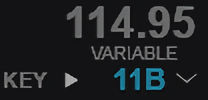
Rather than having the tiny little squiggle (for variable tracks) with the lock above it, I put the word VARIABLE below the BPM, and clicking it locks the tempo & changes the text to LOCKED.
Posté Wed 18 Feb 26 @ 11:50 am
PhantomDeejay
jeromeip wrote :
Is there a way to identify tracks with multiple BPMs? When loaded on a deck and/or when displayed in browser?
There's a new browser column. Variable BPM
It shows "yes" and "multi" depending on what BPM analysis has been made on the track
Posté Wed 18 Feb 26 @ 12:23 pm
