


 PhantomDeejay
groovindj wrote :
I made a thing!
Rather than having the tiny little squiggle (for variable tracks) with the lock above it, I put the word VARIABLE below the BPM, and clicking it locks the tempo & changes the text to LOCKED.
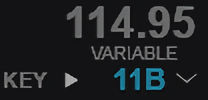
Rather than having the tiny little squiggle (for variable tracks) with the lock above it, I put the word VARIABLE below the BPM, and clicking it locks the tempo & changes the text to LOCKED.
Yeah.. I updated my skin as well
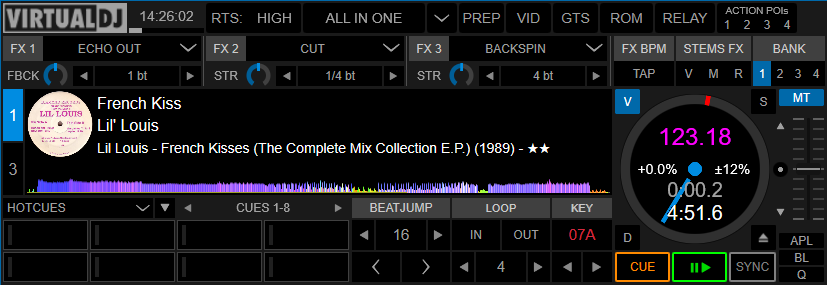
Normal track:
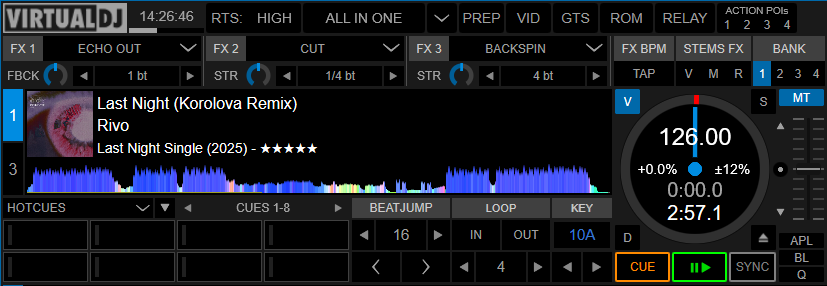
Variable BPM track:
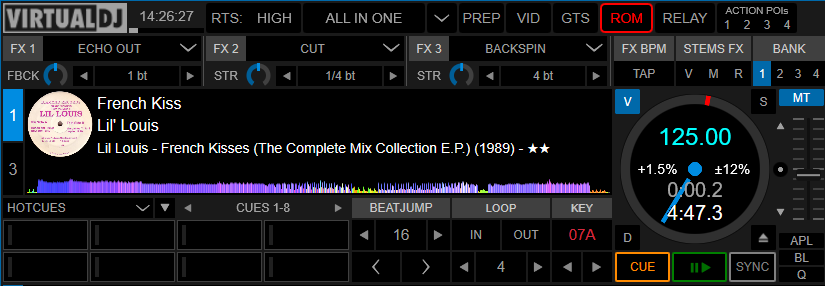
Stabilized track:
Posté Wed 18 Feb 26 @ 12:28 pm
 groovindj
It was seeing your skin this morning and looking at how you did it, that made me think to add the text. 👍
I think maybe some people will find the tilde a bit too small. I did try making it larger, and also making it bright green so it's more visible. The best thing with VDJ is being able to "Frank Sinatra" (do it our way).
I think maybe some people will find the tilde a bit too small. I did try making it larger, and also making it bright green so it's more visible. The best thing with VDJ is being able to "Frank Sinatra" (do it our way).
Posté Wed 18 Feb 26 @ 12:44 pm
 Benz Werner
PhantomDeejay wrote :
There's a new browser column. Variable BPM
It shows "yes" and "multi" depending on what BPM analysis has been made on the track
jeromeip wrote :
Is there a way to identify tracks with multiple BPMs? When loaded on a deck and/or when displayed in browser?
There's a new browser column. Variable BPM
It shows "yes" and "multi" depending on what BPM analysis has been made on the track
The BPM variable isn't showing anything for me !
neither yes
and no multi
Posté Wed 18 Feb 26 @ 1:17 pm
 RobRoy
Werner, that info should show up, once you have analysed a track using the BPM editor only
Posté Wed 18 Feb 26 @ 1:28 pm
PhantomDeejay
Are you sure ?
This is with variable bpm set:
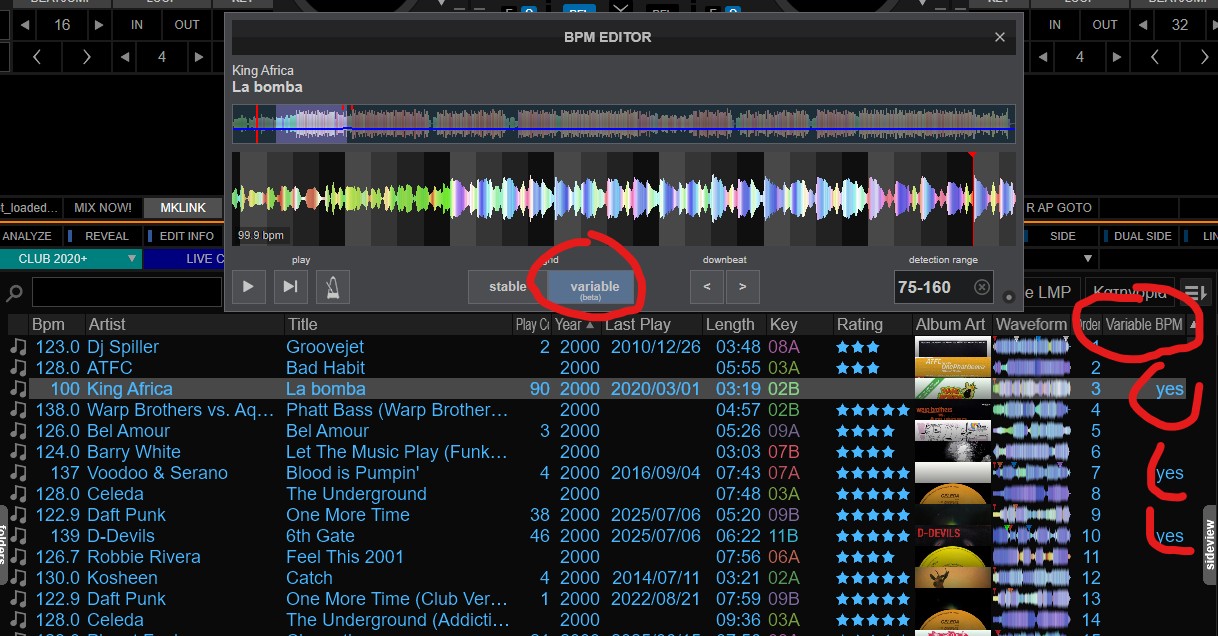
And this is with stable:
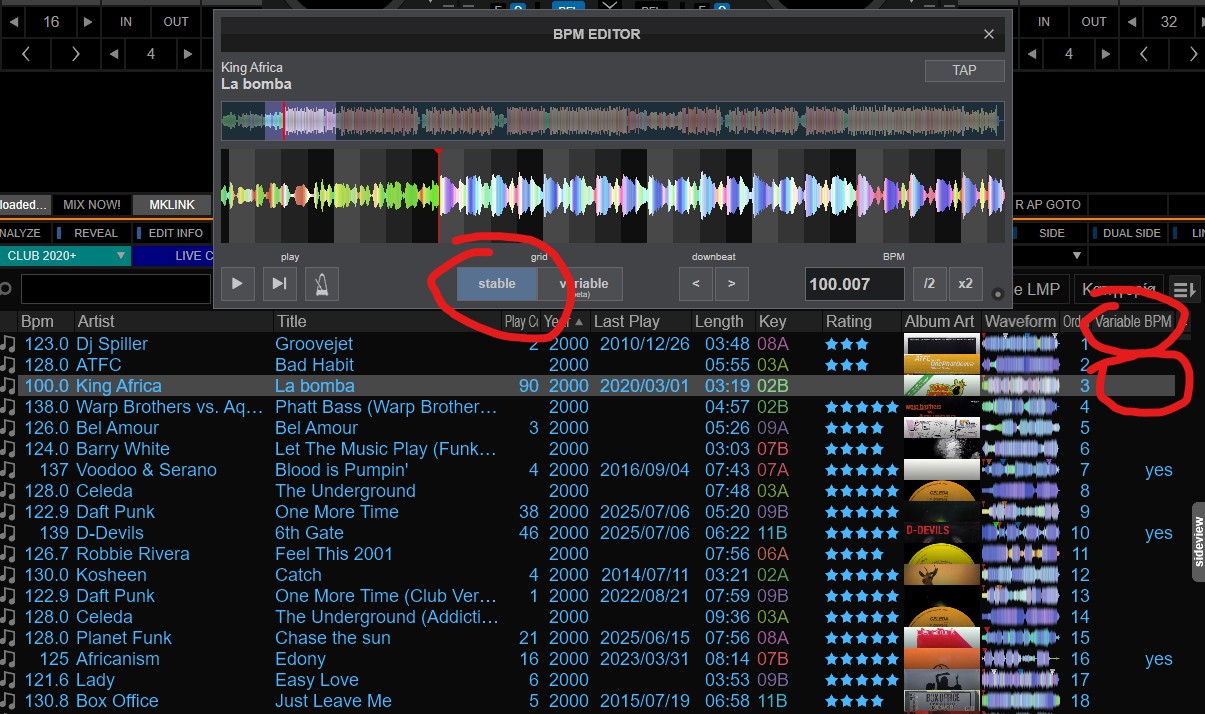
This is with variable bpm set:
And this is with stable:
Posté Wed 18 Feb 26 @ 1:30 pm
PhantomDeejay
RobRoy wrote :
Werner, that info should show up, once you have analyzed a track using the BPM editor only
Yes, as explained on the [NEWS] thread, the new BPM Engine does NOT set a track automatically to variable BPM.
You have to use the BPM Editor (when stable BPM won't cut it) to switch to variable manually.
In the future it will suggest and/or switch to variable BPM automatically based on how much variation exists on a track's BPM, but not for now!
Posté Wed 18 Feb 26 @ 1:34 pm
Benz Werner
@PHANTOMDEEJAY and ROBROY
thanks
thanks
Posté Wed 18 Feb 26 @ 2:29 pm
 the SOUND INSURGENT
All good on my end, Just waiting to be able to batch run my 50s, 60s & 70s folders ;-p
Posté Wed 18 Feb 26 @ 4:35 pm
 djjohnnyrox
Is there a way to assign a shortcut key to activate variable ?
Posté Wed 18 Feb 26 @ 8:25 pm
 kradcliffe
set_variable_bpmtoggles between stable and variable
Posté Wed 18 Feb 26 @ 8:32 pm
IIDEEJAYII
groovindj wrote :
I made a thing!
Rather than having the tiny little squiggle (for variable tracks) with the lock above it, I put the word VARIABLE below the BPM, and clicking it locks the tempo & changes the text to LOCKED.
Rather than having the tiny little squiggle (for variable tracks) with the lock above it, I put the word VARIABLE below the BPM, and clicking it locks the tempo & changes the text to LOCKED.
Love your mod. Very intuitive !
(I may use your idea, again love it)
And agree, that the tilde is a bit too 'unnoticeable'.
My first iteration, (now seeing how I like it), was to just modify the default pro's skin a bit.
Variable track indicator:

Beat stabilized indicator:

Love Virtual DJ, it allows the flexibility to, as you say... "To have it your way"
Also Love the new Variable Beat gridding, it's Amazing !
Posté Wed 18 Feb 26 @ 9:01 pm
 DJ VinylTouch
DJ Faber Zee wrote :
Whoa… what amazing news to wake up to.
I’m really looking forward to the official release, but I do have one question.
Will this feature address the long-standing issue with cue point and loop inaccuracies on Rekordbox-imported tracks?
For those unfamiliar, this is a very frustrating problem that occurs when VDJ reads cue points and loops from Rekordbox. In about 99% of cases, they end up slightly misaligned by a few milliseconds compared to the original Rekordbox data.
With large Rekordbox libraries, it’s simply not realistic to manually correct every imported cue point and loop inside VDJ, which makes this issue even more critical.
Thanks VDJ FAM!
I’m really looking forward to the official release, but I do have one question.
Will this feature address the long-standing issue with cue point and loop inaccuracies on Rekordbox-imported tracks?
For those unfamiliar, this is a very frustrating problem that occurs when VDJ reads cue points and loops from Rekordbox. In about 99% of cases, they end up slightly misaligned by a few milliseconds compared to the original Rekordbox data.
With large Rekordbox libraries, it’s simply not realistic to manually correct every imported cue point and loop inside VDJ, which makes this issue even more critical.
Thanks VDJ FAM!
This went unanswered. I'm certain that the features being discussed here have nothing to do with/no effect on the CDJ export alignment issues with mp3 files - that is an encoder/decoder based issue, and VirtualDJ is not the only software to have that issue (DJay has the problem too). Some software like DJCU have a better time at addressing the issue - I largely believe what was done there was a study of popular encoders/decoders, considering source and destination software and what happens when doing an the export import, resulting in some sort of a database of "this is the shift to apply because it's this situation" during the export process.
Posté Wed 18 Feb 26 @ 9:16 pm
DJ A Sharp - The One Man Band
Am I doing this wrong? Or misunderstanding the feature?
I analyzed a track with variable. Gives me a correctly varying grid. I click the lock to stabilize the tempo. But when I load a track on the opposite deck (which I have set to load with the tempo matched), it matches whatever the VARIABLE tempo is at the moment I loaded, and not the stabilized tempo near the tempo slider.
Am I doing this wrong?
I analyzed a track with variable. Gives me a correctly varying grid. I click the lock to stabilize the tempo. But when I load a track on the opposite deck (which I have set to load with the tempo matched), it matches whatever the VARIABLE tempo is at the moment I loaded, and not the stabilized tempo near the tempo slider.
Am I doing this wrong?
Posté Thu 19 Feb 26 @ 12:33 am
IIDEEJAYII
Was able to reproduce, only when "Auto Match BPM" is enabled.
On the deck with "Auto Match BPM" enabled, a newly loaded track is synced to the playing deck's, underlying variable, momentary BPM, (with bpm_stablizer enabled), Locked. (not the Stabilized BPM)
with, AutoSync enabled
or manually clicking, the sync button, the BPM is synced to the Stabilized BPM, working as expected, (not the underlying variable BPM)
Note: never noticed, since I do not use Auto Match BPM, or AutoSync.
win 11
9171
On the deck with "Auto Match BPM" enabled, a newly loaded track is synced to the playing deck's, underlying variable, momentary BPM, (with bpm_stablizer enabled), Locked. (not the Stabilized BPM)
with, AutoSync enabled
or manually clicking, the sync button, the BPM is synced to the Stabilized BPM, working as expected, (not the underlying variable BPM)
Note: never noticed, since I do not use Auto Match BPM, or AutoSync.
win 11
9171
Posté Thu 19 Feb 26 @ 1:48 am
DJ VinylTouch
Some more comments
Things realized with the Variable Beatgridding:
The BPM Editor itself:
Problematic songs for BPM Analysis
1. With rolling beat but stable BPM
Regular analysis just gets it completely wrong.
Variable BPM does well but adds too many unnecessary markers
2. Variable BPM and changing measures
Variable Analysis is on point, but the downbeats are all over the place
I'm not sure what can be done here because it's really hard to tell the start of measures
The Visualization Upgrades (AI Loops and Patterns) work really well, but I noticed that there is a limit in fine print (4 generations per month)
Is this still based on the Shader tech? Is there instructions for doing such generations with our own platforms and uploading it to VirtualDJ for use?
Things realized with the Variable Beatgridding:
The BPM Editor itself:
- It wasnt immediatly obvious how to add/remove anchors (that is in the right-click menu now)
- Changing the beat for an anchor is much less obvious
There is the downbeat arrows and the right click "shift local downbeat", but you now have to pay attention to the beat highlighing.
Before you could have selected an anchor and say "make that the 1st beat" and that was that
Problematic songs for BPM Analysis
1. With rolling beat but stable BPM
Regular analysis just gets it completely wrong.
Variable BPM does well but adds too many unnecessary markers
- Lil Dicky ft. Chris Brown - Freaky Friday
There is one place where there is minimal instrumentation that it placed like 5 markers - 50 Cent - In Da Club
It also has rolling beat and the regular analysis just gets it completely wrong.
Variable analysis added one or two extra markers unnecessarily
2. Variable BPM and changing measures
Variable Analysis is on point, but the downbeats are all over the place
- Joan Jett and the Blackhearts - I Love Rock & Roll
I'm not sure what can be done here because it's really hard to tell the start of measures
The Visualization Upgrades (AI Loops and Patterns) work really well, but I noticed that there is a limit in fine print (4 generations per month)
Is this still based on the Shader tech? Is there instructions for doing such generations with our own platforms and uploading it to VirtualDJ for use?
Posté Thu 19 Feb 26 @ 2:43 am
DJ A Sharp - The One Man Band
+1 on the downbeat comment.
If I use the variable beatgrid, I can't change the downbeat like I could with standard beatgrid.
If I use the variable beatgrid, I can't change the downbeat like I could with standard beatgrid.
Posté Thu 19 Feb 26 @ 2:50 am
 DJ Faber Zee
DJ VinylTouch wrote :
[quote=DJ Faber Zee]
I am not talking about CDJ exported tracks... I am talking about Rekordbox library read by VDJ.
After a while I realized that fluid Beatgrid won't fix that issue. I hope some day it will be solved.
Thanks once again.
Posté Thu 19 Feb 26 @ 5:15 am
 Mister Tea
This is great work. Looking forward to playing with it. The new visuals feature is really interesting. How about adding functionality to flag your own generated visuals for consideration to be added to a VDJ expansion pack for Pro license users?
Posté Thu 19 Feb 26 @ 10:38 am
groovindj
I did notice there's an export option in the visuals area...
Posté Thu 19 Feb 26 @ 10:48 am
DJ VinylTouch
DJ Faber Zee wrote :
I am not talking about CDJ exported tracks... I am talking about Rekordbox library read by VDJ.
After a while I realized that fluid Beatgrid won't fix that issue. I hope some day it will be solved.
Thanks once again.
DJ VinylTouch wrote :
[quote=DJ Faber Zee]
I am not talking about CDJ exported tracks... I am talking about Rekordbox library read by VDJ.
After a while I realized that fluid Beatgrid won't fix that issue. I hope some day it will be solved.
Thanks once again.
It's still the same problem.
Posté Thu 19 Feb 26 @ 1:11 pm
